
Key Fob Case Replacement Problems: How to Diagnose Fit, Button, and No-Start Issues

If your key fob worked before you opened it and stopped working after the shell swap, the case is not always the real problem. In a lot of repairs, the new shell is fine, but one small part is misplaced, damaged, or not compatible with the original fob.
I’ve seen this kind of issue come down to five things over and over: the wrong replacement shell, a battery that isn’t seated correctly, a rubber button pad that shifted, a transponder chip left behind in the old case, or a circuit board that cracked during removal. The good news is that most of those can be checked without special tools.
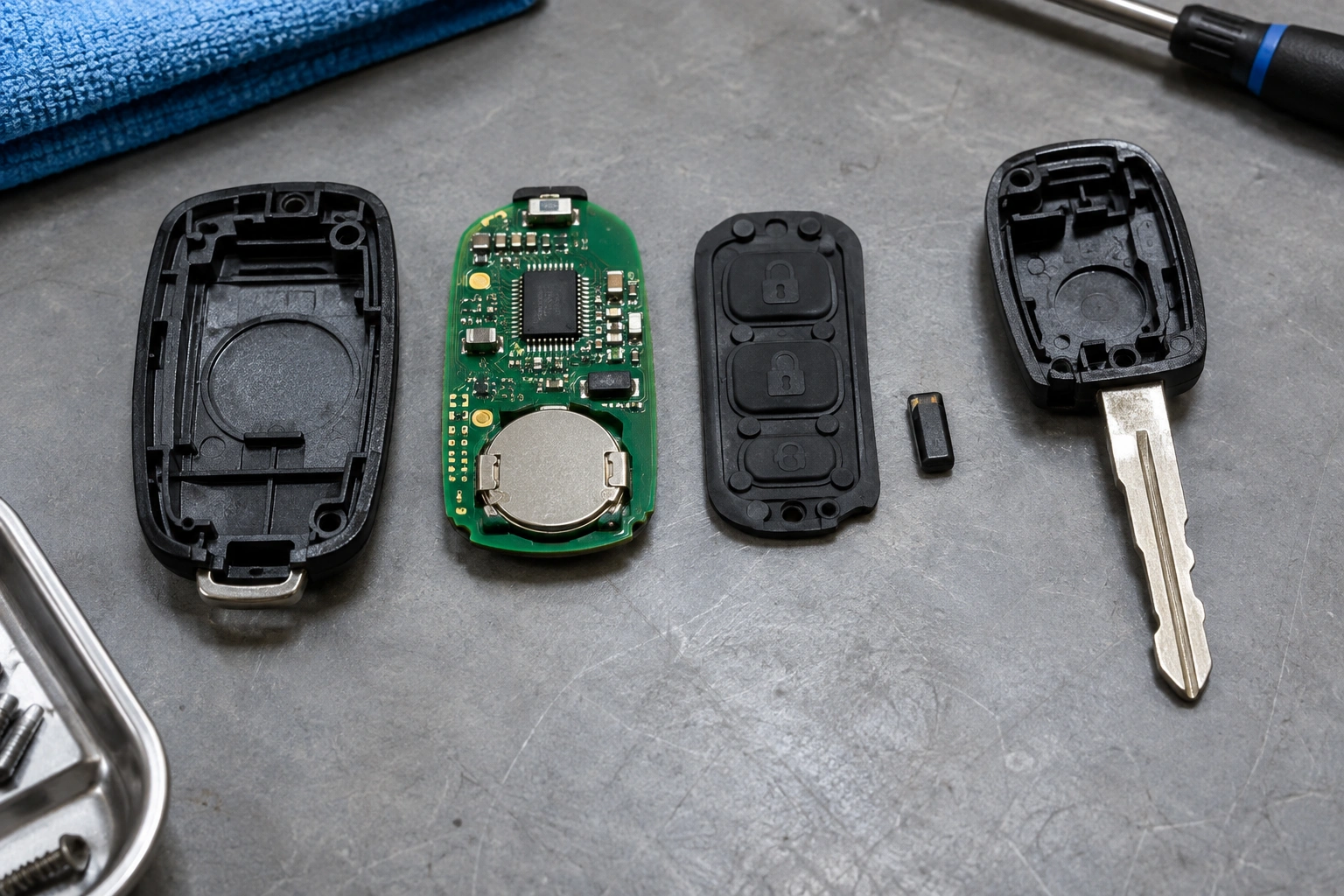
Symptoms After a Key Fob Case Replacement
The fastest way to troubleshoot is to look at what changed after the swap.
| Symptom | Most likely cause | What to check first |
|---|---|---|
| Buttons do nothing | Battery contact issue, dead battery, damaged PCB | Battery polarity, contact tabs, board cracks |
| Buttons work only sometimes | Loose internal parts, bent contacts, poor shell fit | Battery seating, board alignment, shell closure |
| Button feels stuck or mushy | Rubber button pad misaligned, wrong shell | Button pad position, button opening alignment |
| Remote works, but car won’t start | Missing transponder chip, compatibility issue | Chip transfer, key blade style, fob type |
| Flip key won’t open or fold right | Hinge, spring, or blade fit issue | Spring orientation, pivot parts, shell design |
| Case won’t close fully | Internal part not seated | PCB, battery, chip, and button pad placement |
If you want the quickest diagnosis, use this simple decision path:
- Remote doesn’t lock/unlock: start with the battery, battery contacts, PCB seating, and shell fit.
- Locks/unlocks but won’t start: focus on the transponder chip, chip placement, and whether the shell matches the original key type.
- Buttons feel wrong: check the rubber button pad, button openings, and whether the shell is the correct version.
A useful clue is whether the problem is cosmetic or functional. A cracked shell can make the fob ugly and annoying to use, but if the circuit board and chip are healthy, the remote may still work. If the buttons died right after the swap, the failure is more likely tied to assembly, fitment, or damage during disassembly.
If your old fob was already failing before the case swap, the shell change may have exposed a weak battery or a worn board rather than causing the whole problem.
What Usually Causes Problems After a Shell Swap
Most post-swap problems fall into a few categories:
-
Wrong shell version
The shell may look close enough online, but the button layout, blade style, or internal mounting points can differ. -
Transferred parts not seated correctly
The PCB, battery, rubber pad, transponder chip, or spring may be slightly out of place. -
Battery contact problems
A bent terminal or loose battery can make the fob work intermittently. -
Damage during removal
The circuit board is easy to crack if you pry on the wrong edge. -
Flip-key hardware mismatch
Flip keys have more moving parts, so hinge and spring fit matter more than with a simple shell.
For no-lock/no-unlock problems, the most common culprits are battery, contacts, and PCB alignment. For no-start problems, the most common issue is the transponder chip or a shell that does not match the original key type. For intermittent button symptoms, the usual suspects are the button pad, shell fit, and weak battery contact.
If the fob stopped working immediately after the swap, I’d check fitment and transfer mistakes before assuming the vehicle needs reprogramming.
Check Whether the Replacement Case Is the Correct Model
This is where many DIY repairs go sideways. Two shells can look almost identical in photos and still be wrong for your vehicle.
Match these details before you buy or install a replacement shell:
- Button count and layout: lock, unlock, panic, trunk, remote start, and any extra buttons must line up exactly.
- Blade style: standard key blade and flip key shells are not interchangeable.
- Board shape and mounting points: the PCB should sit flat without pressure.
- Transponder chip location: some fobs have a small immobilizer chip in a separate pocket or holder, and some use a glass capsule instead of a loose chip.
- Shell generation: even within the same model year range, different fob versions may exist.
- Smart key / proximity compatibility: smart keys and proximity fobs are often more limited than standard remote shells, so not every replacement housing is interchangeable.
If you have a flip key, compare the hinge and spring design carefully. A shell that fits the outer shape but uses a different pivot can cause the blade to snap open too hard, close unevenly, or bind halfway.
A practical test: if you need to force the shell halves together, the case is probably wrong or a part is out of place. A proper shell should close with light pressure, not a clamp and a prayer.
Step-by-Step Fixes for a Bad Case Replacement
Before you order another shell, open the fob back up and inspect the assembly.
1) Recheck the battery first
Make sure the battery is installed with the correct polarity and sitting flat. A battery that looks “in” but isn’t fully seated can cut power when the case snaps shut.
2) Inspect the battery contacts
Look for bent tabs, flattened springs, or corrosion. Even a slight bend can reduce contact pressure enough to cause intermittent operation.
3) Confirm the PCB is aligned
The circuit board should sit in its molded pocket without rocking. If it is tilted, the buttons may not press the board evenly.
4) Reposition the rubber button pad
The rubber pad must sit in the correct orientation. If it is flipped or shifted, the buttons may feel sticky, soft, or dead.
5) Verify the transponder chip is present
Some fobs have a tiny immobilizer chip that is easy to overlook, and some replacement shells require transferring it from a separate holder or glass capsule. If it stayed in the old shell, the remote may still lock and unlock the doors while the car refuses to start.
6) Close the shell without forcing it
If the case does not close easily, stop and find the obstruction. Forcing it can crack the board or pinch the battery.
That sequence usually finds the problem faster than replacing parts at random.
How to Transfer the Critical Parts Correctly
A shell swap only works if the important pieces move over intact.
Circuit board
Handle the PCB by the edges. Don’t pry against the small soldered components or button contacts. If you see a hairline crack, the fob may fail even if the shell fits perfectly.
Battery
Replace the battery if it is old, weak, or removed during the swap and shows any sign of poor contact. If you reuse it, make sure the terminals grip it firmly.
Rubber button pad
This piece is easy to install upside down or slightly off-center. If one button feels different from the others, the pad may not be seated correctly.
Transponder chip
This is the part most people miss. A remote can sometimes still unlock the car without it, but the vehicle may not recognize the key for starting.
Spring and hinge parts in flip keys
Lay the pieces out in the order they came apart. If the spring is wound the wrong way, the blade may not flip smoothly or may snap open too aggressively.
A good habit is to take a photo before removing anything. That gives you a reference when the new shell does not look exactly like the old one.
Button Alignment, Blade Fitment, and Flip-Key Mechanism Problems
When the buttons feel wrong after a case swap, the shell is usually telling you something.
Sticky or mushy buttons
This usually means the rubber pad is misaligned or the shell opening does not match the board. If the button needs extra force, the pad may be pressing against plastic instead of the PCB switch.
Buttons that do nothing
If the battery is good and the board looks intact, the button contacts may not be lined up with the openings in the shell.
Key blade won’t fold or unfold correctly
On flip keys, the hinge, spring, and blade pocket all need to match. If the blade drags or stops halfway, the shell may be the wrong version or the spring may be installed incorrectly.
Case halves not closing evenly
That often means one internal part is sitting too high. The usual suspects are the battery, chip, or button pad.
A shell swap should improve the feel of the fob, not make it require more force than the broken one did.
When the Battery Is the Problem vs When Electronics Are Damaged
A weak battery can look a lot like a bad shell. The difference is in the pattern.
Battery or contact issue signs:
– Fob works only when pressed hard
– It works after being squeezed in the hand
– Buttons respond inconsistently
– The problem started after the battery was removed and reinstalled
Electronics damage signs:
– Buttons never respond, even with a known-good battery
– The board looks cracked or lifted
– A solder joint or contact point is visibly damaged
– The fob only worked before the board was pried out
If the remote worked before the swap and now does nothing at all, check the battery contacts and PCB first. If those look fine, the board itself may have been damaged during removal.
Do You Need to Reprogram the Fob After Replacing the Case?
Usually, a shell replacement by itself should not require reprogramming, because the electronics never changed. If the original PCB and chip are transferred correctly, the vehicle should recognize the same fob it always had.
That said, a shell swap is mostly a physical repair, not a programming repair. If the remote buttons no longer work after the swap, the first things to check are the battery, contacts, PCB, and shell fit. If the car locks and unlocks but will not start, the problem is usually the transponder chip or key compatibility, not remote reprogramming.
If the fob still will not work after a battery change, the remote may need to be resynced on some vehicles, or the issue may be elsewhere in the fob or vehicle system. For a shell swap, though, I’d verify the physical parts first before assuming a pairing problem.
When to Replace the Shell, the Battery, or the Entire Key Fob
Here’s the simplest way to decide:
Replace the shell only if:
- The remote worked before the case broke
- The PCB is intact
- The transponder chip is present
- The battery and contacts are still good
- The shell is the wrong version, but the electronics and blade hardware are otherwise compatible
Replace the battery too if:
- The battery is old or weak
- The fob was already acting flaky
- You had to remove the battery during the swap anyway
Replace the entire fob if:
- The PCB is cracked or corroded
- The transponder chip is missing or damaged
- The shell you bought is clearly not compatible
- The flip mechanism is badly worn and replacement parts don’t line up
- The fob is a smart key or proximity fob and the housing you bought is not designed for that system
A shell-only repair is the cheapest route, but it only makes sense when the electronics are still healthy. If the board is failing, a prettier case just hides the real problem.
When to Consult a Locksmith
If you’ve checked the battery, contacts, shell fit, button pad, and chip placement, and the fob still fails, it’s time to bring in a locksmith or dealer.
That is especially true when:
– The PCB is cracked
– The transponder chip is missing
– The key is a smart key with more complex compatibility requirements
– The flip-key mechanism will not assemble correctly
– The car starts sometimes and fails other times after the swap
A professional can confirm whether the issue is the shell, the electronics, or the vehicle-side programming without you risking another broken board.
For more help with related remote issues, you may also want to read our guide on key fob range problems after battery replacement and our troubleshooting page on key fob trunk button not working. If you’re still building your repair basics, our key fob battery replacement guides can help you compare battery symptoms with shell-related problems.
FAQs
Why does my key fob work after the swap, but the buttons feel different?
That usually points to a rubber button pad that is shifted, flipped, or not sitting flat against the PCB.
Why does the car unlock but not start after a case replacement?
That often means the remote side is fine, but the transponder chip was missed, misplaced, or damaged.
Do aftermarket shells always fit like the original?
No. Some fit well, but others have looser tolerances or slightly different button openings and hinge geometry.
Can a bad shell damage the circuit board?
Yes, especially if the case is forced closed or the board is pried from the wrong spot during disassembly.
Should I replace the battery while I’m in there?
If the battery is old, weak, or already removed during the swap, replacing it at the same time is usually the cleaner move.
Why won’t my flip key close smoothly?
The spring, hinge, blade pocket, or shell version may not match the original setup.
Is reprogramming always needed after a shell swap?
No. If the original electronics were transferred correctly, reprogramming is usually not the first thing to suspect.
A shell replacement should fix a broken case, not create a new mystery. If you focus on the fit, the contacts, and the tiny parts people usually miss, you can usually narrow the problem down without paying for a full replacement too early.
