
Can Changing a Key Fob Battery Erase Programming? What Drivers Should Know

If your key fob has started acting up, the first question is usually the same: can changing key fob battery erase programming? In most cases, no—replacing the battery does not wipe out the fob’s programming. More often, the fob stops working because the new battery is the wrong type, installed backward, not seated correctly, or making poor contact.
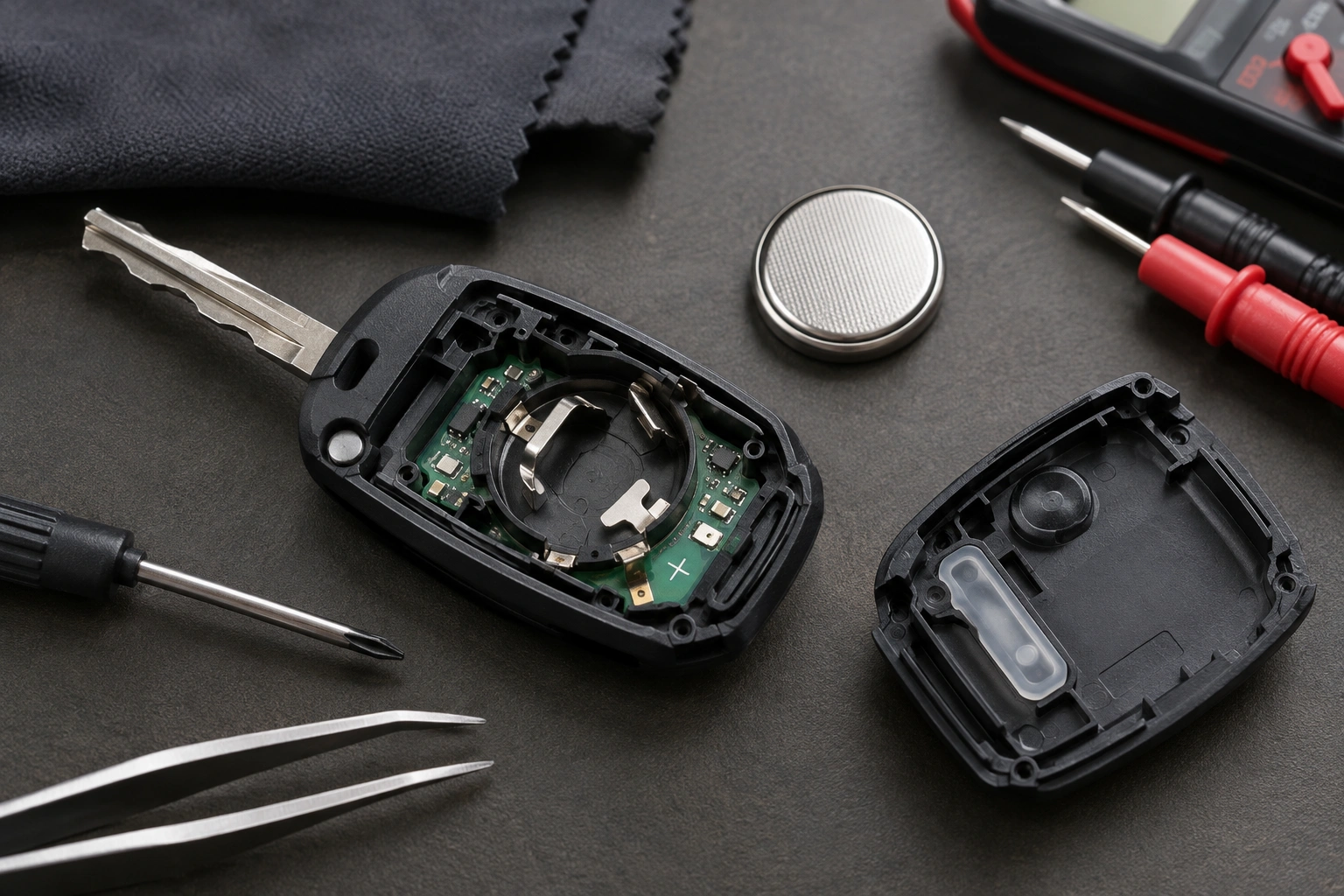
That said, there are exceptions. On some vehicles, a fob may appear to “lose” its settings after a battery change, but that behavior is model-dependent rather than universal. So the goal is not to guess. It’s to separate a simple battery issue from a real programming problem before you spend money on reprogramming or replacement.
Quick answer: does changing a key fob battery erase programming?
Usually, no. The battery powers the remote functions, but the fob’s identity is typically still recognized by the vehicle after a battery swap. If the remote lock/unlock buttons stop working right after you replace the battery, the problem is often installation-related rather than erased programming.
Here’s the practical way to think about it:
- Battery problem: the fob is weak, intermittent, or dead because it has no power.
- Contact problem: the battery is fine, but the terminals are not touching it properly.
- Programming/sync problem: the fob has power, but the vehicle is not responding to its signal.
That distinction matters because the fix is different. A dead or poorly installed coin-cell battery can look exactly like lost programming until you inspect the battery and contacts closely.
How key fob programming actually works
A key fob can do more than one job, and that’s where a lot of confusion starts.
In most systems, the remote button functions and the vehicle’s approval of the key are not stored in the same place. The remote side is usually tied to the fob’s electronics and chip, while the vehicle side stores the matching information it uses to recognize approved remotes or keys. In other words, a battery swap normally removes power, but it does not usually erase the programming itself.
Remote lock/unlock functions
These are the buttons you press to lock the doors, unlock the doors, open the trunk, or trigger panic mode. Those functions depend on the fob battery and the vehicle’s receiver.
Transponder or immobilizer function
Many vehicles also have a chip inside the fob or key that tells the car, “yes, this is an approved key.” That chip is what lets the car start in many push-button and immobilizer-equipped systems.
The important part is that remote button operation and start authorization are not always the same thing. A fob can fail to unlock the doors but still allow the car to start. That usually means the programming was not erased; the remote side is just not working correctly.
For a broader look at how car-side recognition issues can overlap with battery symptoms, see our guide on key fob lost programming.
Symptoms: battery problem, contact issue, or programming loss?
A quick symptom check can save you a lot of trial and error.
| Symptom | Most likely cause | What to try next |
|---|---|---|
| Fob works only when very close to the car | Weak battery or poor contact | Replace battery, check polarity, reseat battery |
| Buttons work sometimes but not consistently | Loose battery, dirty contacts, weak replacement battery | Open the fob and inspect the terminals |
| Fob is completely dead after battery change | Battery installed backward, wrong battery type, damaged contacts | Confirm battery model and orientation |
| Car starts, but remote buttons do nothing | Remote side issue, contact problem, or sync issue | Test spare fob and check vehicle battery |
| Both main and spare fobs fail at once | Vehicle-side problem | Check car battery, fuse, or receiver |
| Fob still fails after correct battery install | Possible relearn or programming issue | Try the vehicle’s reset procedure or consult a locksmith |
Most likely reasons a fob stops working after a battery change
When a fob acts dead after a new battery goes in, these are the most common causes, in order of likelihood.
1. Wrong battery type
Coin-cell batteries look similar, but they are not all the same. A battery that fits physically may still be the wrong voltage or size for your fob. If the fob calls for a CR2032 and you install a similar-looking but different cell, the remote may not work correctly.
2. Battery installed backward
This sounds simple, but it is one of the most common mistakes. The positive and negative sides must match the markings inside the fob. If the battery is reversed, the fob will usually act dead.
3. Poor battery contact
Even with the correct battery, the metal tabs may not be pressing firmly against it. If the battery is sitting slightly high, crooked, or under a loose clip, the fob may power on and off unpredictably.
4. Weak replacement battery
Not every “new” battery is actually strong. A low-quality or old coin cell can cause short range or no response at all. That’s why a fresh battery from a reputable source is better than a random spare from a drawer.
5. Dirty or bent contacts
Corrosion, grime, or a bent terminal can interrupt power. If the fob was opened roughly, a contact can shift just enough to stop reliable operation.
6. Vehicle battery issue
If the car battery is weak, disconnected, or recently replaced, the vehicle may not respond normally to the fob. On some vehicles, vehicle-side electrical issues can affect remote response, especially if the system has recently been jump-started or reset.
7. True sync or relearn issue
Some vehicles may need a reset or relearn after a battery swap, but this behavior varies by make and model. It is less common than battery or contact problems, but it does happen.
For another angle on a common post-replacement headache, our article on why a key fob battery low warning can stay on after replacement explains why a “fixed” fob may still act like it needs attention.
Step-by-step fixes to try first
Before assuming the programming was erased, work through this sequence.
1. Confirm the battery type
Open the fob and check the old battery number. Match it exactly unless your owner’s manual says an approved substitute is acceptable. If the battery type is wrong, stop there and replace it with the correct one.
2. Check the orientation
Make sure the positive and negative sides are installed exactly as shown inside the fob. If the battery is upside down, the fob may not power up at all.
3. Reseat the battery
Remove the battery and reinstall it so it sits flat and snug. The battery should not rock, shift, or sit above the retaining clip.
4. Inspect the contacts
Look for bent tabs, corrosion, or dirt. A gentle wipe can help if the contacts are simply dirty. If a tab is bent out of shape, it may need careful adjustment.
5. Test the spare fob
If your spare works normally, the issue is likely with the original fob. If both fail, the car-side system becomes more suspicious than the battery itself.
6. Try the fob near the vehicle
Stand close to the driver door or place the fob near the start sensor area if your vehicle has one. If it only works at very short range, that usually points to battery power or contact trouble.
7. Check the vehicle battery
If the car battery is weak or recently disconnected, the vehicle may not respond the way it should. That is especially worth checking if multiple electrical oddities show up at the same time.
A practical comparison: if the fob came back to life after you reseated the battery, you likely had a contact issue. If it still does nothing but the spare works, the original fob may need repair or replacement. If both fobs fail, the problem is probably not the coin-cell battery at all.
For a general reference on vehicle safety and electrical issues, the NHTSA is a reliable place to start when you suspect the problem may involve the car rather than the remote.
When reprogramming is actually needed
Reprogramming becomes a real possibility when:
- the battery is correct and installed properly,
- the contacts are clean and intact,
- the spare fob behaves the same way,
- and the vehicle still does not recognize the remote.
A simple decision tree helps here:
Known-good battery + proper install + clean contacts + spare fob test = consider relearn or professional programming.
Some vehicles allow a DIY relearn or sync procedure, but only if the owner’s manual specifically lists one for your model. Others require diagnostic equipment or security access that a dealer or locksmith has. Because relearn behavior is model-dependent, it is safest not to assume one vehicle’s fix applies to another.
One important note: if the car still starts with the transponder chip but the buttons do not work, that does not automatically mean the whole fob lost programming. It may only mean the remote side needs attention.
When to check the car battery, fuse, or receiver
If more than one fob fails at the same time, think vehicle-side first.
A weak car battery can create strange behavior on some vehicles, especially after jump-starts or battery replacement. A blown fuse or receiver issue can also make a good fob seem dead. That is why it helps to ask one simple question: did both remotes stop working together?
If yes, the odds shift toward the car rather than the fob. If no, and only one fob is affected, the battery or internal fob contact is much more likely.
DIY replacement tips to avoid damage
Opening a key fob is usually straightforward, but it is easy to create a new problem while trying to fix the old one.
- Use a plastic pry tool or a gentle seam opener instead of a knife.
- Keep track of tiny springs, clips, and seals.
- Avoid touching the circuit board with greasy fingers.
- Do not force the case shut if the battery is sitting too high.
- Make sure the battery is fully seated before snapping the shell back together.
If the fob has a fragile internal chip or a tight battery holder, forcing it can bend a contact or crack the case. That turns a simple battery swap into a repair job.
When to consult a locksmith
A locksmith is worth calling when the fob still fails after you have confirmed the correct battery, proper orientation, and good contact. A useful rule of thumb is this: if a known-good battery and clean contacts do not restore function, and the spare fob works, a locksmith can help determine whether the issue is the fob or the vehicle.
That is especially true if your vehicle uses a model-specific relearn procedure or if the fob needs security programming that you cannot do at home.
A dealership may be the better route for some vehicles, but an automotive locksmith can often handle remote and key programming faster, and sometimes with less hassle. The trade-off is simple: dealer service may have broader OEM access, while a locksmith may be more convenient and cost-effective for common fob issues.
If you want a second opinion before paying for programming, ask the locksmith whether they can test the fob first. That can prevent you from paying to reprogram a remote that only needed a battery or contact repair.
What to do if the fob still fails after replacement
If the fob still does not work after a correct battery swap, try this order:
- Test the spare fob.
- Reinstall the battery with a known-good one.
- Inspect for liquid damage, corrosion, or bent contacts.
- Check whether the car battery or vehicle electronics are acting up.
- Contact a dealer or automotive locksmith if the problem persists.
That sequence helps you avoid replacing parts that are not actually bad.
Common mistakes that make a working fob seem unprogrammed
These are the errors I see most often when people change the battery themselves:
- installing the wrong coin-cell size,
- flipping the battery backward,
- leaving the battery slightly loose,
- bending a contact tab during reassembly,
- assuming a dead fob always means lost programming,
- and skipping the spare-fob test.
That last one matters more than people think. If the spare works, you already know the vehicle is probably fine and the original fob needs attention.
FAQ
Can a key fob lose programming just from removing the battery?
Usually no. In most vehicles, the programming is stored in the fob’s chip and/or the vehicle’s memory, so a battery swap by itself does not erase it.
Why does my key fob work only when I hold it close to the car?
That can happen with a weak battery, poor contact, interference, or a vehicle-side receiver issue. It does not automatically mean the fob lost programming.
Will replacing the car battery affect my key fob?
Sometimes vehicle-side electrical issues can change how a remote behaves, but that does not mean the fob’s programming was erased. If multiple remotes fail at once, check the vehicle first.
Do I need a dealer to reprogram every key fob?
Not always. Some vehicles allow a DIY relearn, while others require dealer or locksmith equipment. It depends on the make, model, and security system.
Bottom line
So, can changing key fob battery erase programming? Usually not. In most cases, a dead or weak fob after a battery swap comes down to battery type, polarity, contact seating, or a vehicle-side issue—not erased programming.
If you replace the battery carefully and the fob still does not work, move through the checks in this order: battery fit, battery orientation, contact condition, spare fob test, and vehicle battery. Only after that should you assume the fob needs reprogramming.
