
Key Fob Not Working After Battery Replacement? Here’s How to Fix It

If your key fob not working after battery replacement problem started the moment you changed the battery, don’t assume the fob is dead. In a lot of cases, the issue is something simple: the wrong battery type, reversed polarity, poor contact inside the fob, or a battery that is seated just enough to look installed but not enough to actually power the remote.
I’m Jason Carter, and when I used to diagnose electrical problems in the shop, I saw this pattern all the time: a car owner swaps in a fresh coin cell, expects everything to work, and the fob still acts dead. The good news is that this usually narrows the problem down fast. You can often tell whether you’re dealing with a battery issue, a fob hardware issue, or a vehicle-side problem without any special tools.
Why a key fob can stop working after a battery change
A battery replacement should be simple, but key fobs are picky. If the remote worked before you opened it and quit afterward, the most likely causes are installation-related rather than a major failure.
The common culprits are:
- the new battery is the wrong size or type
- the battery is installed backward
- the battery is not fully seated in the contacts
- a protective tab or sticker was left in place
- the internal contact prongs were bent during the swap
- the fob lost sync on a vehicle that needs a resync procedure
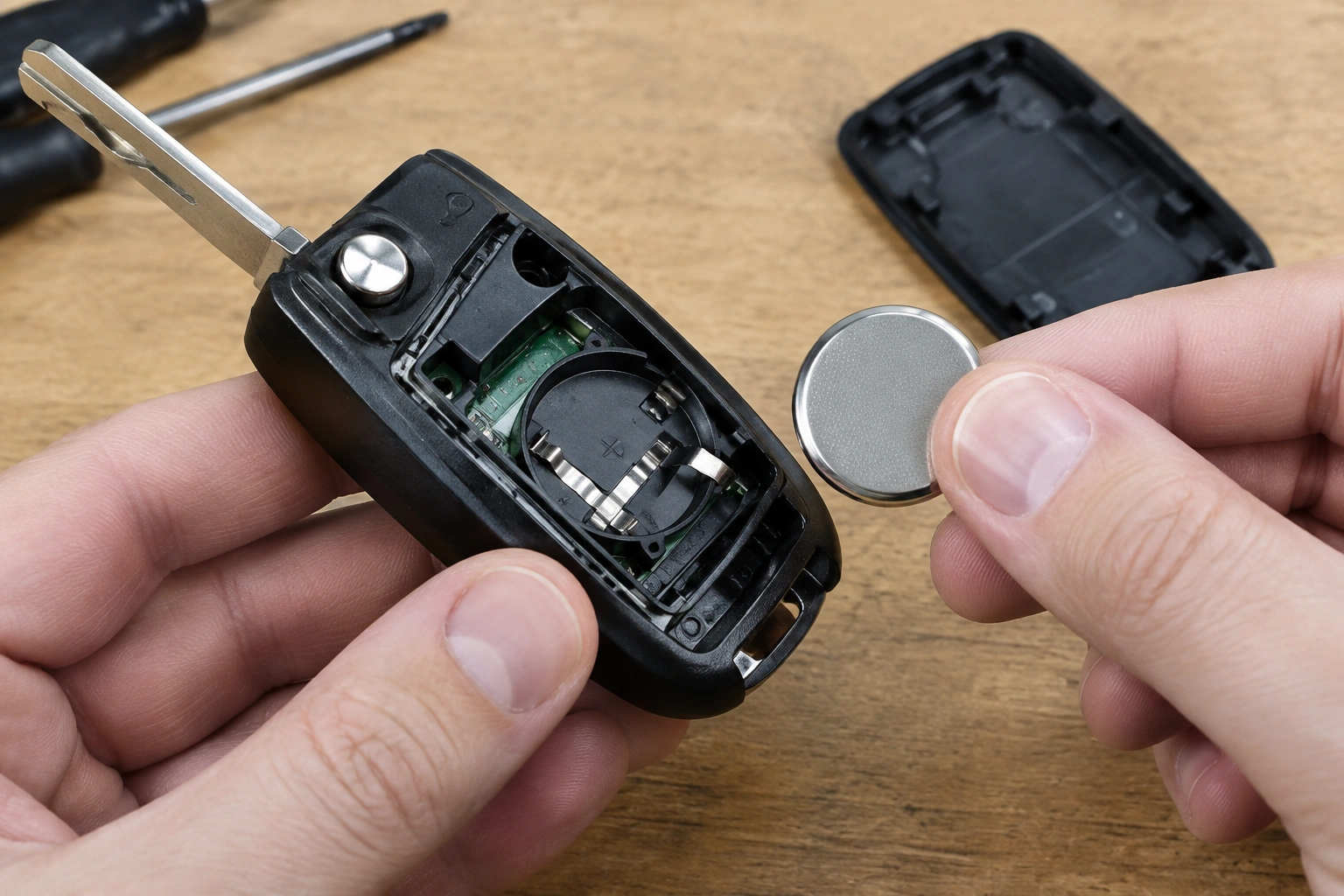
For Toyota fobs, Haynes notes that one possible reason a fob may not work after a battery change is incorrect installation, including reversed polarity. The battery should match the markings inside the fob, with the positive and negative sides aligned correctly. That sounds basic, but it is one of the easiest mistakes to make when you’re working with a small coin-cell battery. Toyota key fob battery installation check
First checks: battery type, orientation, and fit
Before you move on to resets or replacement, verify the battery itself.
Confirm the battery type
Many fobs use a CR2032, but not all do. Some use a CR2025 or another coin-cell size. A battery that is close in shape but not exact can sit loosely or fail to make solid contact. If you still have the old battery, compare the number printed on the face of the cell.
Check polarity
Look for the plus and minus markings inside the fob and match them exactly. If the battery is flipped, the remote usually acts completely dead.
Make sure the battery is actually seated
A battery can look installed but still miss the spring contact by a hair. That’s especially common if the case halves don’t snap together cleanly or if the battery holder is slightly worn. A fob that works only when squeezed is a strong clue that the battery fit is marginal rather than the battery itself being bad.
Remove any insulating material
Some replacement batteries come with a clear protective sticker or insulating tab. If that stays on, the battery can’t power the fob. It’s a small thing, but it’s worth checking before you assume the electronics failed.
If you want a broader checklist for the “battery changed, still not detected” situation, this related guide can help you compare symptoms: key fob not detected after replacing the battery.
Test the spare key fob to isolate the failure
A spare fob is one of the fastest ways to narrow this down.
- If the spare works normally: the car is probably fine, and the original fob has a battery, contact, or internal hardware issue.
- If both fobs fail: the problem may be on the vehicle side, such as a weak car battery, receiver issue, or model-specific programming problem.
That comparison matters because it keeps you from replacing parts blindly. If one remote works and the other doesn’t, the car is telling you the fault is local to the bad fob. If neither works, the fobs are less likely to be the whole story.
Clean and inspect the battery contacts and buttons
Even with a fresh battery, poor contact can make the fob seem dead. This is especially common if the remote only works intermittently or only after you press on the case.
Open the fob and look for:
- dull, oxidized contact points
- bent metal prongs
- loose battery clips
- corrosion around the battery compartment
- cracked plastic that lets the battery shift
If the contacts are dirty, a gentle cleaning with a dry cotton swab or a small amount of isopropyl alcohol on a swab can help. Let it dry fully before reinstalling the battery.
If the contact prongs are flattened or bent away from the battery, cleaning alone won’t solve it. That usually means the fob was stressed during battery replacement or the holder has worn out with age. In that case, the battery may be fine, but the circuit never gets power reliably.
The buttons matter too. Mushy, sticky, or worn buttons can signal a tired membrane or internal wear. If the buttons feel inconsistent, the fob may be sending a weak or no signal even though the battery is new.
Try a reset, resync, or reprogramming procedure
Some vehicles need a resync after the battery has been removed. Others do not. A quick way to tell the difference is this: if the fob worked before the battery swap, the battery is the correct type, the polarity is right, and the contacts look good, then a resync is worth trying; if the remote only failed because the battery was installed backward, loose, or insulated by a tab, fix that first because reprogramming may not be needed at all.
A reset or resync makes the most sense when:
- the battery is the correct type
- polarity is correct
- the contacts look good
- the spare fob is unreliable too, or the original fob stopped working immediately after battery removal
If your owner’s manual lists a relearn or resync sequence, use that exact procedure. Vehicle-specific steps matter here; random “universal” button combos are a waste of time on many models and can add confusion.
If you’re dealing with a fob that stopped working after a programming attempt or seems to have lost pairing, this guide may help you sort out the next step: key fob not working after reprogramming.
Check the vehicle battery and receiver system
A weak vehicle battery can sometimes create keyless-entry problems that look a lot like a bad fob, especially if the car has other electrical symptoms too, such as slow cranking, dim lights, or odd warning messages.
The vehicle battery becomes a stronger suspect when:
- both fobs fail at the same time
- remote range suddenly drops a lot
- the car shows “key not detected” or a similar warning
- the fob worked normally until the vehicle sat unused for a while
A practical clue is whether the car still behaves normally otherwise. If the battery is weak, you may also notice the starter turning slowly, interior lights dimming, or the dash acting inconsistent. If the car starts and runs normally but the remote functions are the only thing failing, the issue may be more likely on the receiver or fob side than the main battery.
The receiver side matters too. Remote keyless entry relies on the car’s ability to hear the signal. If the vehicle-side system has a fault, a perfectly good fob can look dead. That’s why the “both fobs fail” test is so useful: it shifts attention away from the remote and toward the car.
For general vehicle electrical safety and battery-related warning signs, the NHTSA is a reliable place to start if you want official vehicle safety information.
Signs the key fob itself is damaged
If the battery is correct, the contacts are clean, and the spare fob comparison still points to the original remote, the fob itself may be damaged.
Look for these signs:
- water or moisture inside the case
- green or white corrosion on the circuit board
- cracked plastic shell or broken internal mounts
- worn button pads
- a battery compartment that no longer holds the cell tightly
- a fob that worked only after being squeezed or tapped
Water damage is especially important. A fob can survive long enough to fool you, then fail after the battery change because opening the case exposes already weakened parts. Corrosion around the battery area usually means the damage is not just cosmetic.
At that point, cleaning may restore function only temporarily, if at all. If the board is corroded or cracked, replacement is usually the practical answer.
Battery problem vs. fob hardware vs. vehicle issue
This table can help you decide where to focus next.
| Symptom | Most likely cause | Best next step |
|---|---|---|
| Fob died right after battery change | Battery orientation, wrong size, or poor contact | Recheck polarity, seating, and battery type |
| Fob works only when pressed tightly | Loose battery fit or bent contacts | Inspect and adjust contacts carefully |
| One fob works, the other doesn’t | Original fob issue | Clean contacts, inspect for damage, consider replacement |
| Both fobs fail | Vehicle battery, receiver, or vehicle-specific issue | Check car battery and consult the manual |
| Fob worked before, then stopped after removal | Lost sync or reprogramming issue | Try the model-specific resync procedure |
| Buttons feel mushy or unresponsive | Worn internal button pads or damaged board | Inspect for wear; replacement may be more realistic |
When to replace the fob versus keep troubleshooting
If the fob has corrosion, cracked internals, or a battery holder that won’t grip the cell, replacement usually makes more sense than repeated repairs. The same is true if you’ve already confirmed the battery, contacts, and sync steps and the remote still won’t respond.
A simple rule helps here:
- Keep troubleshooting if the issue looks like battery fit, contact wear, or a missed reset step.
- Replace the fob if the case is damaged, the board is corroded, or the remote remains dead after basic checks.
That decision saves time and avoids chasing a problem that has already crossed from “fixable” into “worn out.”
When to consult a locksmith
Call a locksmith or dealer when the fob needs pairing, the vehicle requires a special relearn procedure, or both remotes fail and you can’t isolate the problem to the fob itself. An automotive locksmith is often a good first call for remote keyless entry issues and basic key programming, while a dealer is usually the better route for model-specific pairing steps, immobilizer-related work, or vehicles with more tightly controlled programming procedures.
If your car uses a transponder key or a smart key system, it’s also possible for the remote-lock buttons and the starting function to behave differently. That can make the problem look more confusing than it is. A professional can separate the remote keyless entry issue from the immobilizer side much faster than guesswork.
Quick troubleshooting summary
If your key fob still doesn’t work after battery replacement, follow this order:
- Confirm the battery type matches the fob.
- Check polarity against the markings inside the case.
- Make sure the battery sits firmly in the contacts.
- Remove any sticker or insulating tab.
- Test the spare fob.
- Clean and inspect the battery contacts and buttons.
- Try the vehicle’s specific reset or resync procedure if the battery swap itself didn’t solve it.
- Check the vehicle battery if both fobs fail.
- Look for corrosion, cracked parts, or water damage.
- Replace the fob or get professional programming if the problem persists.
That sequence covers the most likely fixes without wasting time on the wrong one first.
FAQ
Do all key fobs need reprogramming after a battery change?
No. Many key fobs work normally after a battery swap and do not need reprogramming at all. If the remote stopped because the battery was installed incorrectly or the contacts are poor, fixing that issue is usually enough.
How can I tell whether the problem is the remote buttons or the immobilizer?
If the lock and unlock buttons do nothing, the remote side is likely the issue. If the buttons work but the car still won’t start, the transponder or immobilizer side may be involved. Some vehicles separate those functions, so one can fail while the other still works.
Should I reseat the battery or replace it with a new one?
If the battery is new and the fob still fails, reseat it first to make sure it is oriented correctly and making solid contact. If the battery is old, questionable, or the wrong size, replace it with a known-good battery instead of trying to reuse it.
Is a locksmith or dealer better for a key fob problem?
A locksmith is often a good choice for remote functions and basic programming help. A dealer is usually better for model-specific programming, immobilizer pairing, or vehicles that require proprietary procedures.
What if my key fob still works only sometimes?
Intermittent operation usually points to battery contact issues, worn buttons, or internal damage. If pressing the case helps, the battery or contacts are often the first place to look.
