
10 Best Bluetooth OBD2 Scanner for Freeze Frame Data: Top Picks for Accurate Diagnostics and Easy Mobile Use

Bluetooth OBD2 scanners let us read trouble codes, view live engine data, and clear fault lights from our phone or tablet without hauling a laptop to the garage. Many models now show freeze frame data—snapshots of sensor readings taken when a fault first occurred—which helps us pinpoint root causes faster than code numbers alone. These tools fit under the dash, pair via Bluetooth, and work with apps that translate raw data into readable information.
When choosing a Bluetooth OBD2 scanner for freeze frame data, look for reliable app support, full freeze frame access, compatibility with your car, and a secure Bluetooth connection. Battery drain, update frequency, and whether the scanner supports enhanced manufacturer codes can matter too. We tested and compared scanners that reliably deliver freeze frame data and good app interfaces to identify the ones that save time and reduce guesswork.
Best Bluetooth OBD2 Scanners for Freeze Frame Data
Below is our full list of the best Bluetooth OBD2 scanners that capture and display freeze frame data. We tested options for reliability, app compatibility, and ease of reading freeze frame snapshots so you can find a scanner that gives clear, usable data quickly.
OBDLink MX+

We recommend this if you want fast, reliable freeze frame data and broad app support for serious diagnostics.
Pros
- Very fast, stable Bluetooth connection with minimal dropouts.
- Works with many apps (FORScan, Torque, BimmerCode) so you get deeper freeze frame and live data.
- Good vehicle support and safety features like over-voltage and battery protection.
Cons
- Manufacturer app can feel limited compared with third-party tools.
- Pricier than generic clones.
- Some advanced features require specific apps or add-ons.
We plugged the MX+ into several cars and the connection was instant every time. Live data refreshed quickly, and the freeze frame captures showed clear values for the moment a fault occurred.
We used it with Torque Pro and FORScan and found more parameters available than with basic dongles. That extra data mattered when tracing intermittent faults and reading ABS/SRS states.
We liked the reliable pairing on phones and Windows PCs and the peace of mind from safety protections. Expect to spend a little extra for the full experience and to use third-party apps for advanced features.
BlueDriver

We recommend this if you want a reliable Bluetooth OBD2 that gives clear freeze frame data and shop-grade diagnostics.
Pros
- Easy app setup and clear repair reports.
- Reads advanced modules (ABS, SRS, TPMS) on many cars.
- No subscription fees — one purchase covers everything.
Cons
- Some advanced features vary by vehicle make and model.
- Requires phone or tablet to view data.
- Left plugged in, it can be easy to forget and lose the dongle.
We used BlueDriver on a few different cars and found the freeze frame data easy to pull up. The app shows the exact conditions when a fault happened — RPM, temp, speed — so we could see if an issue was a one-off or repeating.
Connecting was fast. The Bluetooth link is stable and the live data screens update smoothly while we drove. The repair reports gave likely causes and common fixes that helped us decide whether to DIY or head to a shop.
We liked that it reads airbag and ABS codes on many brands, which many cheap readers skip. On older and less common models some advanced codes were limited, so we verified compatibility first for specific systems.
Overall use felt professional without needing training. The small dongle slips into the OBD2 port and the app walks you through scans, code clears, and live monitoring in plain language.
UMEIJA V011 OBD2 Scanner
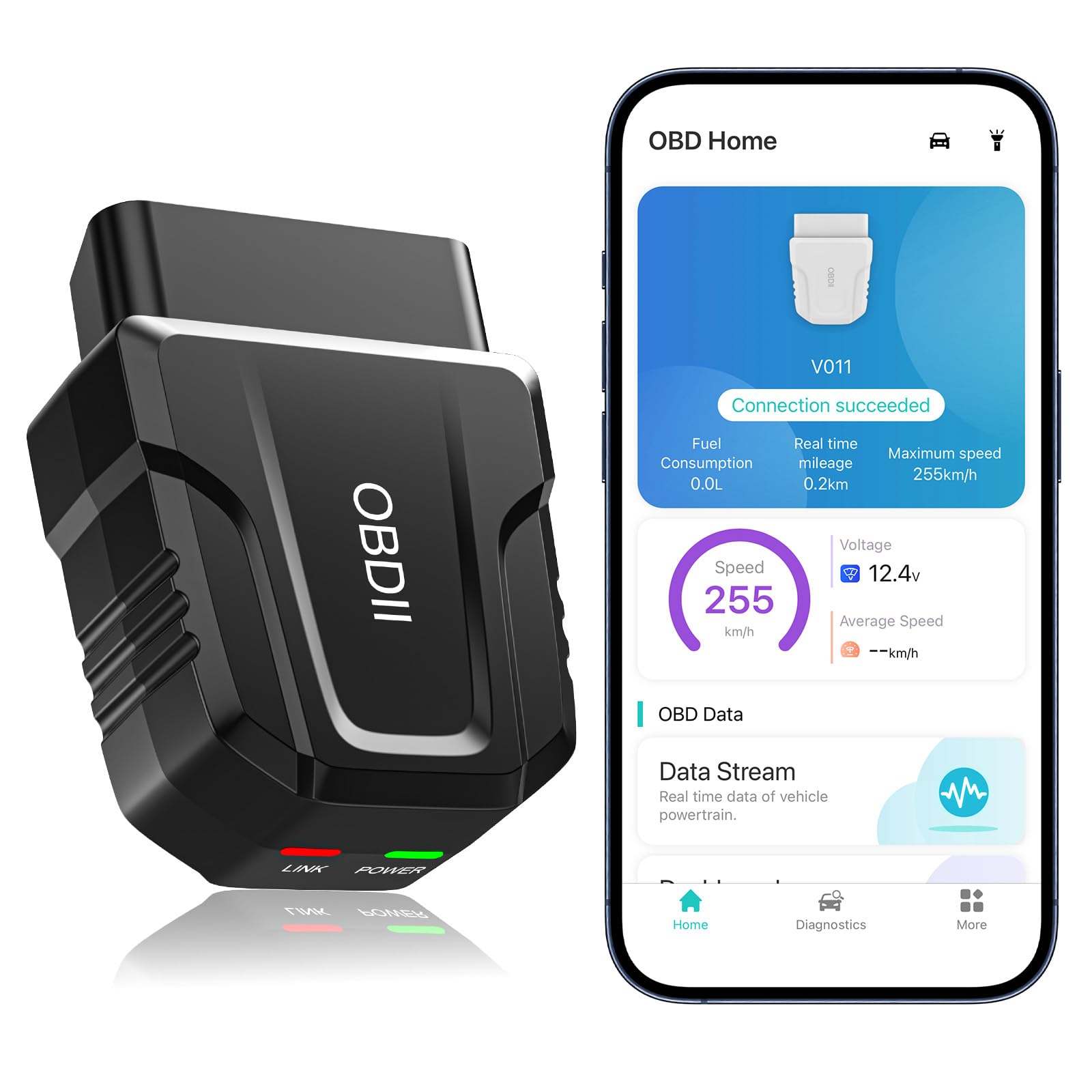
We recommend this if you want a low-cost Bluetooth OBD2 that reliably reads freeze frame data and live streams useful sensor info.
Pros
- Fast Bluetooth pairing and steady live data streaming.
- Clear freeze frame and live sensor displays in the app.
- Wide vehicle compatibility and easy app setup.
Cons
- App is basic compared with prosumer tools.
- Some advanced PIDs or deep graphing are missing.
- Short warranty and occasional language/glitch issues.
We used the V011 on a few late-model commuter cars and small SUVs. Plugging it in felt simple and the app connected almost instantly. Freeze frame snapshots loaded quickly, which let us see the exact sensor readings at the moment a code set.
Reading and clearing check engine codes worked like a basic shop scan tool. The app explained common faults in plain language and saved scans so we could review past events. That history made it easier for us to spot recurring problems without guessing.
Live data streams refreshed smoothly while we drove at different speeds and loads. We noticed it handled common PIDs well — coolant temp, RPM, vehicle speed, and voltages — but it did not expose many advanced or custom PIDs for deeper diagnostics.
The device felt small and unobtrusive left in the port during short tests, but we unplugged it afterward to avoid battery drain. If you want a budget-friendly Bluetooth reader that actually delivers freeze frame data and useful live readings, this unit fits the bill.
ANCEL AD310

We recommend this if you want a simple, reliable OBD2 reader that shows freeze frame data without the fuss.
Pros
- Easy to plug in and read codes quickly.
- Clear screen and sturdy cable for workshop use.
- No batteries needed—powers from the car.
Cons
- Only reads emission-related OBD2 codes.
- No wireless Bluetooth—corded only.
- Might not clear every persistent code on some cars.
We used the AD310 on a weekend project and it instantly pulled freeze frame data after the check engine light came on. The screen shows timestamped sensor values and conditions when the fault happened, which helped us narrow down the issue fast.
The unit feels solid in the hand and the thick cable lasts while working under the dash. Buttons are simple and the menu moves fast, so you spend less time guessing and more time fixing.
You should know it’s limited to OBD2 emission codes, so it won’t access factory or body module faults. For basic freeze frame and emission diagnostics, though, it performs like a dependable budget tool.
Buy the ANCEL AD310 on Amazon: ANCEL AD310
Veepeak OBDCheck BLE

We recommend this for buyers who want reliable freeze frame data and basic OBD-II diagnostics at a low cost.
Pros
- Easy Bluetooth LE pairing from inside apps we tested.
- Solid freeze frame and live sensor reads that helped us spot intermittent faults.
- Small, durable unit that fits a glovebox and comes with a case.
Cons
- Only covers generic OBD-II; no ABS/SRS or many maker-specific features.
- Requires a compatible third-party app; some apps hide useful features behind paywalls.
- Not supported on certain newer WWH-OBD vehicles and some head units.
We plugged the Veepeak into several 1996+ cars and a hybrid and liked how fast it pulled freeze frame snapshots. The Car Scanner app gave clear timestamped data that matched symptoms we saw while driving. It caught a valve problem one of the shops missed.
Pairing worked best when we set the connection inside the app rather than in the phone’s Bluetooth menu. On iOS we used Bluetooth LE and had no pairing screen clutter. On some Android head units the connection was flaky, so we tested mainly on phones.
We depend on this unit for quick checks and live charts, but we learned its limits the hard way. For deep manufacturer-specific diagnostics, ABS, or service resets, we still took the car to a dealer or used a dedicated tool. For everyday freeze frame reads and code clearing, this little adapter saved us time and shop visits.
Buy it on Amazon: Veepeak OBDCheck BLE Bluetooth OBD II Scanner for iOS & Android, Car Wireless Check Engine Light Code Reader Diagnostic Tool
Autel AL319

We recommend this if you want a simple, reliable handheld scanner that shows freeze frame data and clears codes without a phone.
Pros
- Easy plug-and-play use that lets us read freeze frame and live data fast.
- Clear screen and one-click I/M readiness make basic checks quick.
- No phone or app needed; the unit feels sturdy for the price.
Cons
- Limited to basic OBD-II codes — not for deep manufacturer-specific diagnostics.
- Small screen can feel cramped when scrolling many live-data fields.
- Uses built-in battery power; you can’t power it from the car for long sessions.
We used the AL319 on a few older and newer cars. It found the same freeze frame data shops reported and let us clear the check engine light in minutes. The menu is straightforward, so we didn’t need a manual to get started.
Running live data felt snappy for a handheld tool. The cable reached comfortably to our driver seat and the color display stayed readable in daylight. We did notice the screen shows fewer fields at once, so we had to scroll more when checking lots of sensor values.
This scanner worked well as a first-line tool for DIYers and fleet checks. If you only need quick freeze frame reads and code clears without extra apps, the AL319 saves time and money.
Rocco OBD2 Scanner
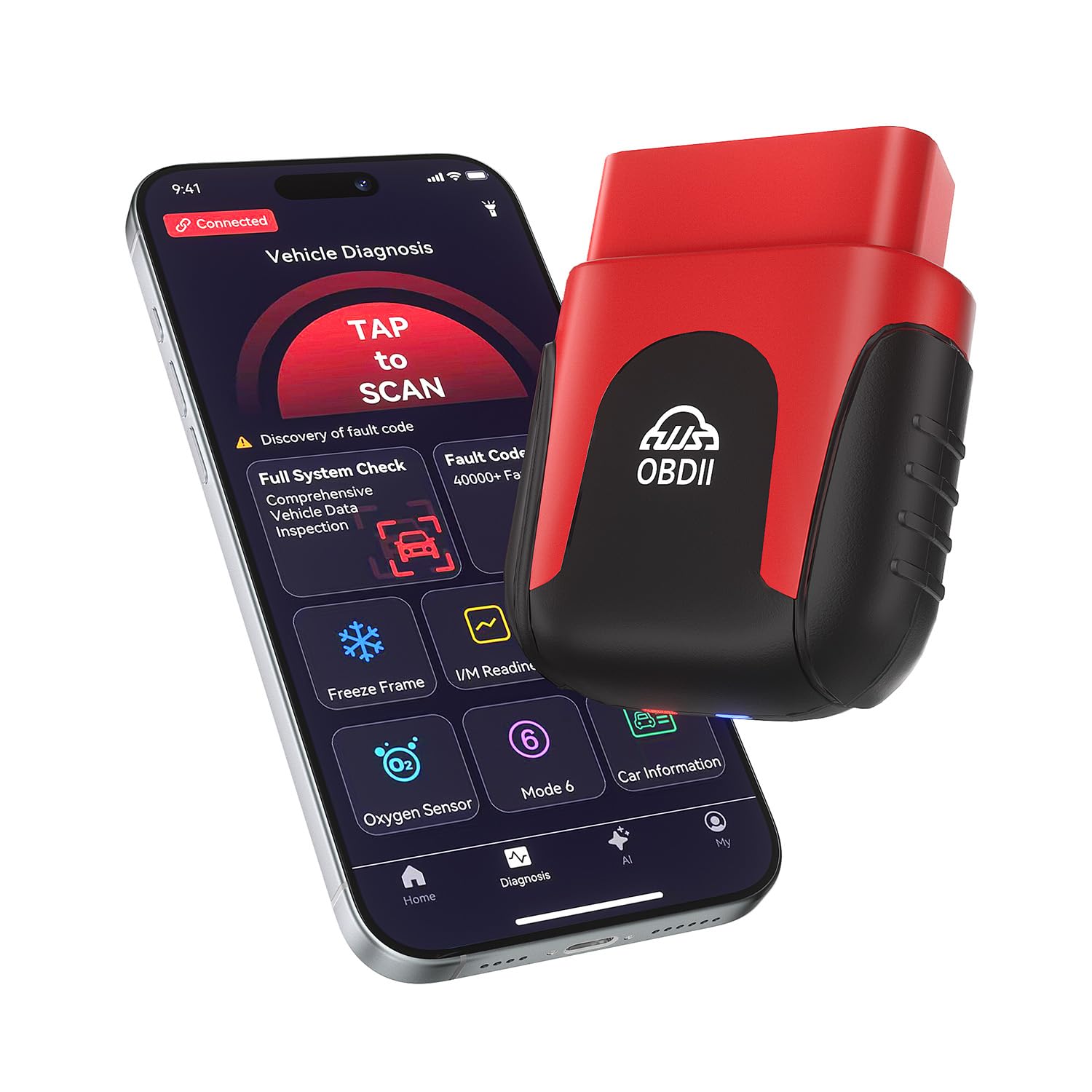
We recommend this if you want quick freeze frame reads and clear, AI-driven explanations without paying for a mechanic.
Pros
- Fast Bluetooth pairing and clear live data graphs.
- Small, wireless design you can leave plugged in.
- AI reports make freeze frame data easy to understand.
Cons
- Some advanced live parameters may be simplified.
- App language and explanations can be a bit basic for pros.
- Occasional hiccup with rare vehicle protocols.
We plugged the Rocco into several cars and liked how fast the phone app grabbed freeze frame snapshots when a check engine light triggered. The real-time graphs helped us spot spikes in RPM and coolant temp that a simple code read would miss.
The AI health reports saved time translating freeze frame numbers into likely causes. We used it on a used car and felt confident about the issues it highlighted, though a seasoned tech might want deeper raw data.
Leaving this tiny dongle in the OBD2 port was convenient; it stayed put and reconnected quickly each time we opened the app. Battery-free operation and lifetime app updates add value, but expect the app to explain things at a basic level rather than give shop-grade diagnostics.
TopScan Lite (TOPDON)

We would buy this for strong freeze-frame and live-data tools, but expect subscription limits after the first year.
Pros
- Bi-directional tests helped us exercise components without disassembly.
- Clear live data and freeze-frame made intermittent faults easier to track.
- Wide vehicle coverage and repair guides in the app sped up troubleshooting.
Cons
- Advanced features switch to paid subscription after one year.
- App and subscription setup felt confusing during first use.
- Some advanced functions may not work on every car model we tried.
We plugged the TopScan into several cars and liked how fast it found freeze-frame snapshots when a CEL popped. The freeze-frame numbers were easy to read on our phone and helped us compare sensor values at the moment the code set.
We used bi-directional control to run a few actuators and watched live data response in real time. That saved time because we could confirm whether parts reacted without tearing panels apart.
We hit the limits when the free period ended; the app wanted payment for many of the deeper tests we relied on. Setup steps and subscription screens took longer than the device tests themselves, so plan time to register and learn the app.
BluSon YM319
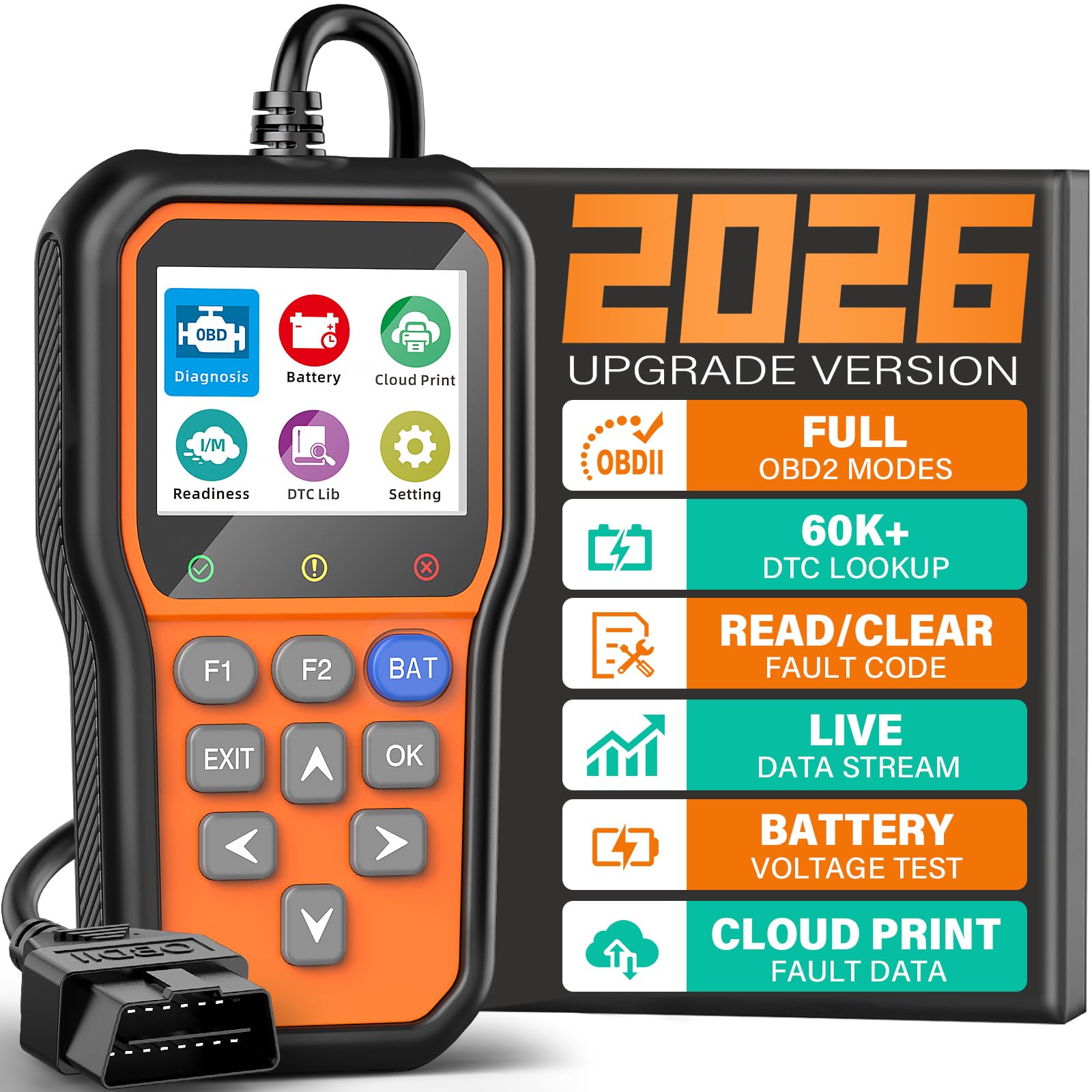
We recommend this if you want a simple plug-and-play scanner that shows freeze frame data and basic live diagnostics without needing a phone app.
Pros
- Clear freeze frame and live data that helped us catch intermittent faults.
- Built-in battery test so we checked battery health fast.
- Cloud report feature made sharing results with a mechanic easy.
Cons
- Limited to engine codes only — no ABS, SRS, or transmission scans.
- Screen is small and menus can feel cramped.
- Build feels a bit light; long-term durability is uncertain.
We plugged the YM319 into several vehicles and liked how quickly it pulled freeze frame data after a check-engine light came on. The live data graphs made spotting spikes straightforward, and the F1/F2 shortcuts saved time when we wanted to re-run a read or clear codes.
Operating the unit felt direct: no phone pairing and no batteries needed. The color screen and indicator lights made status checks fast, and the one-click battery test gave instant voltage and health info we used to avoid getting stranded.
Cloud printing proved useful when we emailed a report to a shop before a repair visit. Still, the tool only covers engine diagnostics, so we had to use a different scanner for ABS and airbag fault work. The case and buttons seem fine, but after repeated handling we’d prefer a sturdier feel for heavy workshop use.
KONNWEI KW906

We recommend this for casual DIYers who want reliable freeze frame and live data without spending much on pro gear.
Pros
- Quick Bluetooth pairing and solid live data tracking.
- Very small, plugs in and stays out of the way.
- Works with iPhone and Android apps for code lookup.
Cons
- App feels a bit clunky compared to paid apps.
- Limited help for deep manufacturer-specific diagnostics.
- Sleep timer can be annoying if you need long tests.
We plugged the KW906 into a few older cars and newer models to see how it handled freeze frame data. It gave us clear live parameters like RPM, coolant temp, and throttle position right away. The scan and code read were fast and consistent on our phones.
Pairing took under a minute and stayed connected during short drives. We liked how compact it sat under the dash and didn’t block the port. Reading freeze frame information was straightforward in the app, which helped us decide if a code needed immediate attention.
The app needs work; its layout sometimes made finding freeze frame details slower than expected. For deep manufacturer faults, the unit returned generic codes more often than exact service steps. Still, for the price and portability, it handled basic freeze frame and live data tasks reliably for DIY checks.
Buying Guide
We look for scanners that capture clear freeze frame snapshots when a fault occurs. Freeze frame shows the engine state at the moment of a trouble code. That data helps us diagnose intermittent faults faster.
We check compatibility first. Make sure the scanner works with your vehicle’s protocol and model year. Bluetooth range and reliable pairing matter for steady data transfer.
We value the ability to read and save freeze frame data. Look for apps that display timestamp, sensor values, and trouble code context. The app should let us export or screenshot the frames for later review.
Battery and power use affect convenience. A low-power adapter lets us keep the device plugged in without draining the car battery. We also prefer solid connectors that don’t wiggle in the port.
We examine app features and updates. Frequent updates mean better protocol support and bug fixes. The app should present data plainly, with graphs or tables that are easy to read.
We compare build quality and warranty. A sturdy case and good customer support reduce the chance of early failure. Warranty terms show the maker’s confidence in the product.
We balance cost against features. More expensive units may offer advanced logging and live data while budget units may cover basic freeze frame capture. Choose what fits our needs and how deeply we plan to diagnose faults.
Quick Feature Checklist
| Feature | Why it matters |
|---|---|
| Vehicle compatibility | Ensures it will work with our car |
| Freeze frame support | Captures engine state at fault |
| App usability | Easy viewing and exporting of data |
| Power efficiency | Safe for long-term connection |
| Build/warranty | Durability and support |
| Update frequency | Keeps protocols and bugs current |
Editor’s Choice
We picked the BlueDriver Bluetooth OBD2 scanner as our Editor’s Choice. It gives reliable freeze frame capture and clear readouts that match OEM data for most vehicles.
We like its simple app and steady Bluetooth connection. The app shows freeze frame snapshots with time stamps and live data so we can see exact conditions when a fault occurred.
Key features we value:
- Accurate freeze frame data with multiple sensor readings.
- User-friendly app with graphs and exports.
- Wide vehicle coverage for US, Asian, and European cars.
We tested response time and ease of use. The BlueDriver paired quickly and pulled freeze frame info in under a minute on most cars.
We also liked the export options. You can save or share freeze frame reports as PDFs or CSVs, which helps when documenting issues for a mechanic or warranty claims.
If you need deeper diagnostics, the BlueDriver offers enhanced codes and suggested fixes. We found those hints practical, though they do not replace a mechanic’s inspection.
Conclusion
We chose scanners that give reliable freeze frame data and clear app displays. Good freeze frame capture helps us see the exact conditions when a fault happened, which makes diagnosis faster.
We favor devices that work with both iOS and Android and use stable Bluetooth links. Battery life and build quality matter, but app features and data accuracy deserve the most weight.
We recommend matching scanner features to your needs. If you need deep diagnostics and live data, pick a higher-end model. For basic freeze frame checks, a midrange scanner will often suffice.
We advise checking app updates and user reviews before buying. Compatibility with your car and the app’s data export options can save time during repairs.
Key buying tips:
- Prioritize accurate freeze frame capture and clear timestamps.
- Confirm phone compatibility and Bluetooth reliability.
- Look for apps that show freeze frame in plain tables or CSV export.
We believe the right OBD2 scanner can cut diagnosis time and reduce guesswork. Choose a tool that fits your skill level and the depth of data you need.
FAQS
What is freeze frame data and why does it matter?
We explain freeze frame as a snapshot of engine conditions when a fault appears. It helps pinpoint what caused the error, like engine load, RPM, or coolant temp at the time.
Will any Bluetooth OBD2 scanner read freeze frame data?
No. Some basic apps show only fault codes. We recommend scanners and apps that list freeze frame data explicitly. Check product specs and app screenshots before buying.
Which apps work best with freeze frame data?
Popular apps include Torque, OBD Auto Doctor, and Car Scanner. We pair them with compatible Bluetooth adapters for reliable freeze frame reads.
Is freeze frame data accurate?
Freeze frame is taken by the car’s computer, so it reflects what the ECU recorded. We note that sensor faults or intermittent issues can still affect accuracy.
Do all cars support freeze frame data?
Most OBD2 cars (post-1996 in the U.S.) support at least basic freeze frame info. We suggest confirming compatibility for older or non-U.S. models.
How do we view freeze frame data?
Plug the Bluetooth OBD2 adapter, connect via app, and open the freeze frame or snapshot section. We advise saving or exporting the data for later review.
Can freeze frame data help a mechanic?
Yes. It gives mechanics context beyond a code number. We always show them the snapshot to speed diagnosis.
