
Car Alarm Not Responding to Key Fob: A Practical Troubleshooting Guide

If your car alarm is not responding to the key fob, the fastest fix is usually not the alarm itself. In many cases, the issue is a weak fob battery, a weak vehicle battery, lost sync, or simple radio interference. Start with the easiest checks first so you do not waste time replacing parts that are still good.
I’m Jason Carter, and after years in the shop, I learned that security-system complaints often look bigger than they are. A fob that works only at close range can point to a different issue than a car that will not respond at all after a dead battery or jump-start. This guide will help you sort out the difference and choose the next step with confidence.
Quick diagnosis: what the symptom is telling you
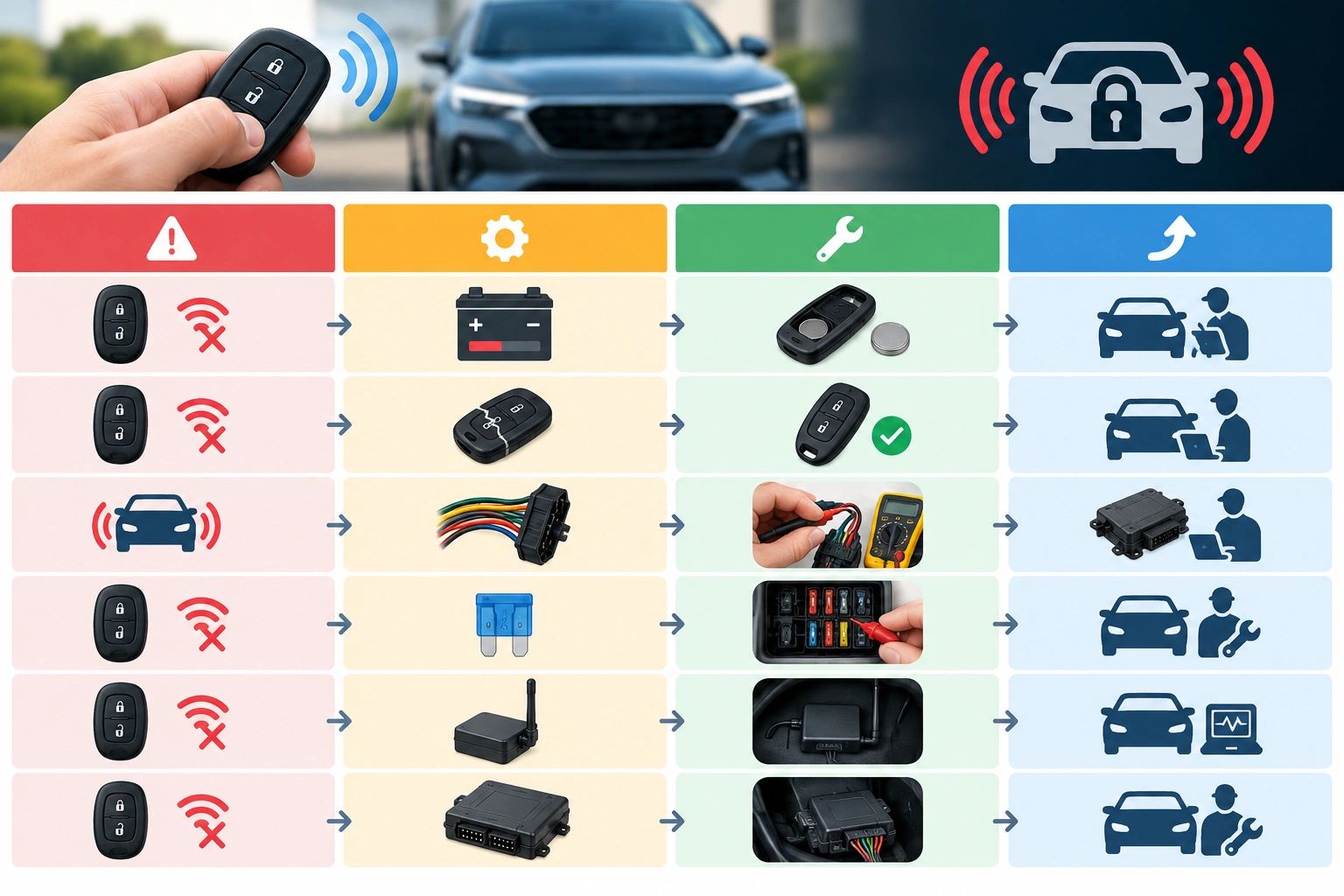
The first job is to match the symptom to the most likely cause.
If the fob does nothing at all, the battery inside the fob is the first suspect. If the doors unlock but the alarm will not disarm, the problem may be lost programming, interference, or a vehicle-side fault. If the fob works only sometimes, a weak battery, worn internal contacts, or a failing receiver becomes more likely. If the alarm started acting up right after the car battery died or was disconnected, sync loss moves up the list.
A quick way to think about it is this:
– No response at all: fob battery, damaged fob, or programming loss
– Partial response: weak fob battery, worn buttons, or interference
– Intermittent response: weak battery in the fob or car, damaged contacts, or receiver issue
– Alarm sounds but won’t stop: sync problem, immobilizer issue, or vehicle security-system fault
Here’s a simple comparison to keep you on track:
| Symptom | Most likely cause | Best first fix | When to escalate |
|---|---|---|---|
| Fob does nothing anywhere | Dead fob battery or damaged fob | Replace battery, inspect contacts | If still dead, replace or test fob |
| Fob works only very close to car | Weak battery or interference | Move away from interference, replace battery | If range stays poor, inspect car-side receiver |
| Alarm won’t disarm but doors still unlock | Lost programming or alarm/immobilizer issue | Try resync procedure from owner’s manual | Dealer or locksmith if sync fails |
| Problem started after battery change | Sync loss | Reprogram or resync fob | Professional programming if required |
| Locks act erratically too | Weak car battery or electrical problem | Test vehicle battery and charging system | Mechanic if voltage is unstable |
For background on how low vehicle voltage can affect remote response, NHTSA’s vehicle safety resources are a reliable place to start if you want broader safety guidance on electrical issues and vehicle operation.
Most likely causes, from easiest to hardest to fix
In the shop, I used a simple rule: check the cheapest, fastest fix first.
- Key fob battery
- Radio interference or range issue
- Car battery or low vehicle voltage
- Lost programming or sync
- Physical damage inside the fob
- Fuse, receiver, immobilizer, or alarm module fault
That order matters because it keeps you from jumping straight to a replacement fob when the real problem is a battery or a sync issue. It also helps you separate a fob problem from a vehicle problem, which saves a lot of frustration.
Step 1: Check the key fob battery and basic fob function
A weak or dying fob battery is one of the most common causes of intermittent key fob trouble. In practice, it often shows up as short range, delayed response, or a fob that works only after several button presses.
Replace the battery if:
– the fob range suddenly got worse
– the alarm responds only when you are right next to the car
– the fob is old enough that you do not remember the last battery change
– the battery warning light or low-key-fob message appears on the dash, if your vehicle has one
If you open the fob, look for corrosion, a loose battery, or a battery that does not sit firmly in the holder. A battery that is installed backward or not making solid contact can act dead even if it is new.
If the fob has a removable coin-cell battery, swap it with the exact type specified for your vehicle. Then test the lock, unlock, and alarm functions from a few feet away first. If the fob still fails, the problem is no longer just the battery.
One useful comparison: a dead battery usually causes total or near-total failure, while a weak battery often causes short range or intermittent response. That difference helps you decide whether to stop at the battery or keep troubleshooting.
Step 2: Rule out car battery and electrical problems
A weak vehicle battery can cause the alarm system or central locking to respond inconsistently to the fob. That is especially true if the car shows other electrical symptoms at the same time.
Look for:
– slow cranking
– dim interior or dash lights
– locks that cycle oddly
– warning lights that flicker
– the alarm acting strangely after a jump-start
If the car battery is weak, the remote system may not recognize the fob reliably. That is why a fob that seems “dead” sometimes comes back to life after the vehicle battery is charged or replaced.
If you have a multimeter, check battery voltage with the car off and again while starting. If you do not, the practical test is simpler: if the car is sluggish to start or the electrical system seems unstable, address the vehicle battery first before assuming the fob is bad.
This is one of the most common mistakes: replacing the fob battery while ignoring a failing car battery. The fob may be fine, but the vehicle may not be in a stable enough electrical state to receive its signal.
For a deeper look at vehicle battery-related starting problems that overlap with remote issues, see our guide on how to start a car when the key fob is not detected.
Step 3: Check for signal interference and range issues
Sometimes the fob is working, but the signal is getting blocked.
Try the fob:
– right next to the driver’s door
– in a different parking spot
– away from tall metal structures
– away from other electronics in your pocket or bag
Parking garages, crowded lots, and areas with heavy radio traffic can reduce range. A nearby electronic device can also create enough interference to make the system seem unresponsive.
A good test is to stand directly beside the car and press the fob once. If it works there but not from farther away, you are probably dealing with either a weak fob battery or interference rather than a total failure.
If you suspect interference, move the car to a different location and try again before replacing parts. That simple step can save you from buying a new fob when nothing is wrong with it.
Step 4: Re-sync or reprogram the key fob
If the fob stopped working after a dead battery, a vehicle battery disconnect, or a jump-start, lost sync is a real possibility. On some vehicles, the remote and control module can lose synchronization, and many manufacturers include a manual resynchronization procedure in the owner’s manual.
This is where the owner’s manual matters. Some vehicles let you resync the fob with a simple sequence of ignition and button presses. Others require dealer-level programming tools. I would not guess here: use the exact procedure for your make and model.
A few clues point toward sync loss:
– the fob worked before a battery event
– the lock buttons still seem alive, but the alarm will not disarm
– the fob works inconsistently after battery replacement
– the car recognizes some functions but not others
If your manual includes a reset or synchronization procedure, follow it exactly and test again. If it does not, or if the procedure fails, do not keep cycling random button combinations. At that point, the next step is professional programming.
Step 5: Inspect the fob for physical damage
A fob can look fine on the outside and still have an internal issue.
Check for:
– cracked casing
– worn or mushy buttons
– battery contacts that look bent or corroded
– signs the fob has been dropped or exposed to moisture
– buttons that only work when pressed hard
A fob that works only when you squeeze it in a certain spot often has an internal contact problem. That is different from a simple battery issue. If the case is damaged or the circuit board has corrosion, repeated battery changes will not fix it.
This is where repair versus replacement becomes a real decision. If the shell is broken but the board still works, a repair or case replacement may make sense. If the fob is intermittent, water-damaged, or physically worn out, replacing the whole fob is often the more practical route because the problem may return even after a temporary repair.
Step 6: Check fuses, receiver, immobilizer, and alarm module faults
If the easy fixes do not change anything, the problem may be on the vehicle side.
Possible causes include:
– a blown fuse for the remote entry or alarm circuit
– a faulty receiver
– an immobilizer communication issue
– a security module problem
These faults usually show up when the fob itself tests okay but the car still refuses to respond. If multiple key fobs fail at the same time, that pushes suspicion away from the remote and toward the vehicle.
At this stage, you are into diagnosis rather than quick troubleshooting. A technician may need to check power, ground, and module communication before the real fault is found.
What to do if the alarm is going off and the fob will not stop it
If the alarm is sounding and the fob will not shut it off, focus on safe access first.
Use the mechanical key to enter the vehicle if your fob has one. Some cars will trigger the alarm when opened this way, but that still gets you inside. Once inside, try the backup start method if your vehicle has one. If you have a spare key fob available, try it as well, since that is a quick at-home way to tell whether the original fob is the problem. Our guide on key fob not detected near car explains the common backup-start approach in more detail.
If the alarm stays active after entry, check the owner’s manual for the exact emergency disarm or start procedure. If the manual allows battery disconnect as part of the process, follow that guidance carefully; do not disconnect the car battery just to silence the alarm unless the manufacturer says it is acceptable. Do not force the ignition or door lock if it feels stiff. If you are stuck in a public place, or the alarm is creating a safety issue, call for professional help rather than continuing to experiment.
Replace, repair, or reprogram: how to decide
Use the symptom pattern to choose the next move.
Choose battery replacement if:
– the fob works weakly or intermittently
– the range is poor
– the battery is old or unknown
Choose reprogramming or resyncing if:
– the problem started after a car battery disconnect or dead fob battery
– the fob used to work and suddenly does not
– the car still seems to recognize some remote functions
Choose repair or replacement if:
– the case is cracked
– buttons are worn out
– the fob works only when pressed a certain way
– there is visible corrosion or water damage
Choose replacement fob if:
– the board is damaged
– the remote is unreliable even after a new battery
– programming is successful but the fob still behaves inconsistently
In general, repair is most realistic when the issue is limited to the shell, buttons, or battery contacts. Replacement is usually the better bet when the fob has water damage, intermittent internal faults, or repeated failures after a new battery, because those problems often come back even if the fob seems to work again for a while.
If you want a deeper look at the button-side symptoms that can overlap with alarm problems, our guide on key fob buttons not responding covers the fob-side diagnosis in more detail.
When to Consult a Locksmith
Call a dealer, locksmith, or mechanic when:
– the fob battery and car battery both check out
– resync attempts fail
– multiple fobs stop working at once
– the alarm or immobilizer keeps acting up
– the vehicle will not unlock, disarm, or start safely
A locksmith can often be the faster choice for many key and fob issues, especially when simple programming or replacement is needed without a dealership visit. A dealer may still be necessary for vehicles that need immobilizer coding or OEM-only access. The best choice depends on the type of work your vehicle needs, not just the lowest advertised price.
FAQ
Why does my key fob unlock the doors but not stop the alarm?
That usually points to a sync issue, a vehicle-side alarm problem, or a partial fob failure. The lock function and alarm-disarm function do not always fail for the same reason.
Can a weak car battery cause the alarm not to respond?
Yes. If the vehicle battery is low, the car may not respond consistently to the fob, especially if you also notice dim lights or slow cranking.
How do I know if the fob lost programming?
A common clue is that the fob worked before a dead battery, jump-start, or battery disconnect and then stopped working afterward. If a resync procedure from the owner’s manual restores it, programming loss was likely the issue.
Is it worth replacing the whole fob?
If the fob is intermittently failing, physically damaged, or already several years old, replacement can be more practical than repeated battery swaps or repairs. If the problem is only a dead battery, though, replacing the whole fob would be unnecessary.
What if the alarm goes off and I cannot stop it?
Use the mechanical key for entry, then try the backup start method or the manufacturer’s emergency disarm procedure. If that does not work, contact a locksmith or mechanic for help.
Can radio interference really block the signal?
Yes. Tall structures, crowded parking areas, and nearby electronics can reduce range enough to make the fob seem dead when it is not.
Should I call a dealer or locksmith first?
If you suspect simple programming, a locksmith is often the faster first call. If the vehicle needs immobilizer coding or OEM-only access, a dealer may be the better fit.
Final thought
When a car alarm is not responding to the key fob, the fastest path is to test the fob battery, vehicle battery, interference, and sync one step at a time. That approach catches most everyday failures without turning a simple problem into an expensive one.
