
Honda Keyless Remote Not Working? A Step-by-Step Fix Guide for Owners

If your Honda keyless remote suddenly stopped unlocking the doors, only works sometimes, or shows a “key not detected” message, the problem usually falls into a short list of causes. The good news is that the fastest fix is often simple: a weak fob battery, a weak car battery, or a sync issue after power loss.
Work through the symptoms in order, because the pattern tells you a lot. A remote that works at close range but not across the parking lot points to a different issue than a Honda that unlocks fine but won’t recognize the fob for push-button start.
Quick Diagnosis: What the Honda Keyless Remote Is Doing
Before you replace anything, match the symptom to the likely cause and the next step.
| Symptom | Most likely cause | What to do next |
|---|---|---|
| Remote works only sometimes or only at very close range | Weak fob battery, worn buttons, or interference | Replace the fob battery first |
| Lock works but unlock does not | Worn button contacts or weak fob battery | Try the spare fob, then replace the battery |
| Doors unlock, but push-button start says the key is not detected | Weak fob battery, sync issue, or vehicle-side detection problem | Test the spare fob and check the car battery |
| Neither Honda fob works | Car battery issue, vehicle receiver problem, or broader electrical issue | Check the vehicle battery and look for other electrical symptoms |
| One fob works and the other does not | Fob-specific battery, damage, or programming issue | Replace the battery in the failing fob and compare results |
| Fob stopped working after the car battery died or was replaced | Sync/resynchronization issue | Try the owner-level resync procedure in the manual first |
| Some buttons work, but one button does not | Worn button contacts or internal fob damage | Test the other buttons, then inspect or replace the fob shell |
A useful way to narrow it down is to separate one-fob-only failures from both-fobs failures:
- If one fob fails and the spare works: the problem is usually in the failing fob.
- If both fobs fail: look at the car battery, vehicle-side detection, or a system-wide issue.
- If the doors work but push-button start does not: the issue may be with fob detection, the immobilizer, or the backup start procedure rather than the lock/unlock buttons.
If your Honda still locks and unlocks from the driver’s door button, but the remote no longer works from across the driveway, that usually points to the fob itself rather than the car’s locks. If the car says “Keyless Remote not Detected” even when the fob is inside the cabin, that shifts suspicion toward the fob battery, the vehicle battery, or the detection system.
Most Likely Causes, in the Right Order
For a Honda keyless remote not working, check the most common causes in this order:
- Key fob battery
- Car battery
- Button wear, moisture, or physical damage
- Sync or programming problem
- Vehicle receiver or immobilizer issue
That order matters because it keeps you from overpaying or replacing parts you don’t need. A dead CR2032 battery in the fob is far more common than a failed receiver module. But if both your main fob and spare fob fail at the same time, the fob battery is less likely to be the whole story.
Step 1: Replace the Key Fob Battery
This is the easiest place to begin because it solves a lot of Honda remote problems.
Many Honda remotes use a CR2032 battery, though the exact battery can vary by model and year. Check your owner’s manual or open the fob carefully to confirm the size before buying a replacement.
How to replace a Honda key fob battery
The exact case shape varies by model, but the basic process is similar:
- Remove the mechanical key if your Honda fob has one. Look for the release button or switch on the fob, then slide the key out.
- Open the fob case using the seam around the edge. Use the mechanical key or a small flat tool to gently pry the case apart. Work slowly so you do not crack the shell.
- Take note of the battery orientation. The positive side usually faces the same direction as the old battery, but confirm before removing it.
- Remove the old CR2032 battery and insert the new one in the same orientation.
- Snap the fob case back together and reinstall the mechanical key.
A weak fob battery usually shows up as:
– shorter range
– intermittent lock/unlock
– one button working better than another
– needing to stand very close to the car
After the battery swap, test the fob right away:
– lock and unlock the doors
– test any panic or trunk button you use regularly
– if your Honda has push-button start, test the start function too
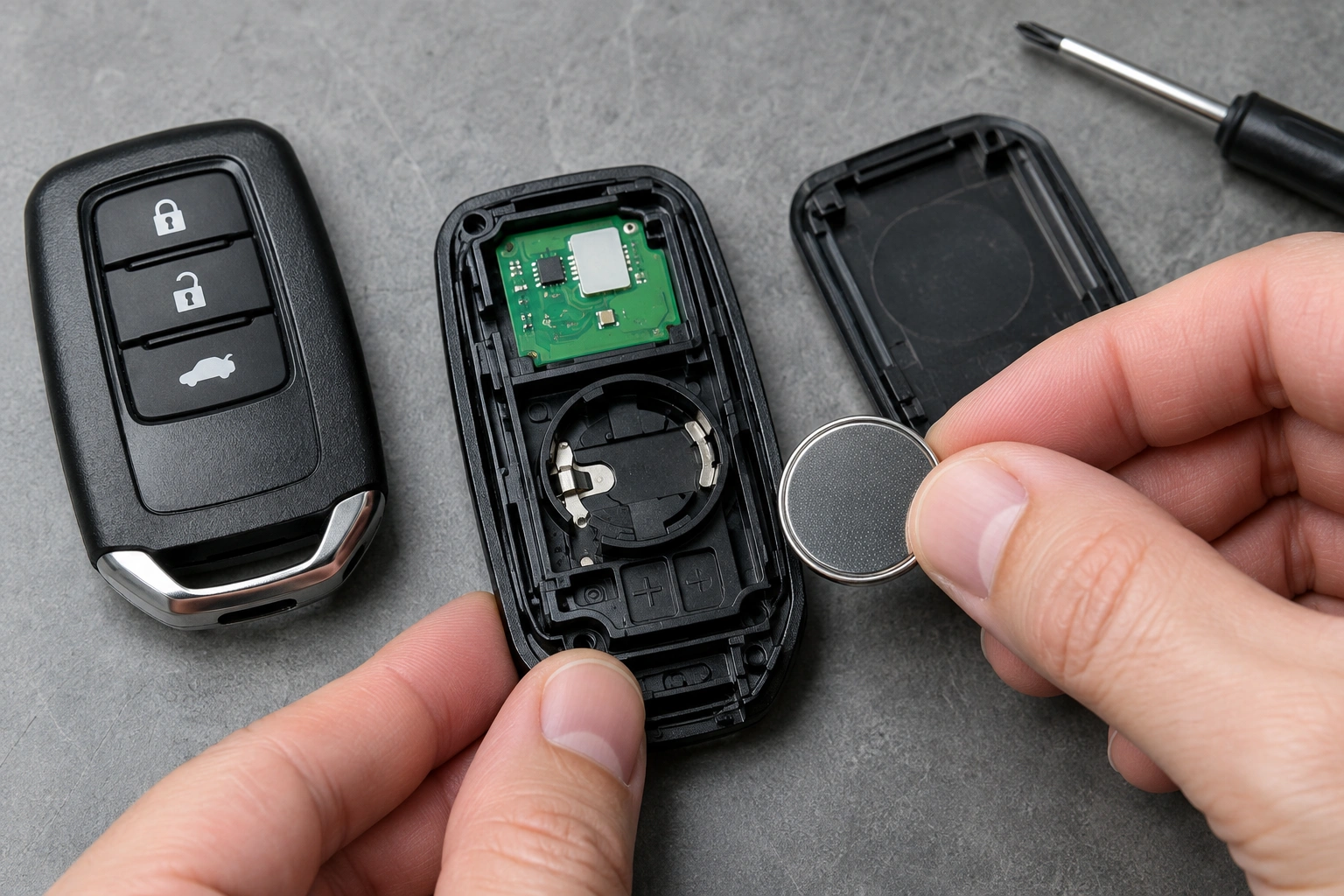
If the remote works again after the battery swap, keep an eye on it for a few days. If the issue comes back quickly, that can mean the battery wasn’t the only problem, or the fob has worn contacts or water damage.
For general vehicle battery safety and warning signs, NHTSA’s vehicle safety resources are a general place to start if the car itself is showing electrical trouble too.
Step 2: Test the Spare Fob and Compare Results
The spare fob is one of the best diagnostic tools you already own.
Here’s how to use it:
– Try the spare fob in the same location where the main fob failed.
– If the spare works normally, the problem is probably in the original fob.
– If both fobs fail the same way, look at the vehicle battery, receiver, or another car-side issue.
This comparison helps separate a fob problem from a vehicle problem. That distinction saves time. For example, if one Honda fob unlocks the car fine and the other does nothing, you’re probably dealing with a dead battery, worn buttons, or a damaged remote rather than a car-wide failure.
If your spare fob has been sitting unused for years, don’t assume it’s perfect. Its battery may be weak too. Swap batteries if needed before you call the car-side system guilty.
Step 3: Check the Honda Car Battery and Electrical Symptoms
A weak car battery can make the keyless remote seem broken, especially if the vehicle is having trouble waking up its electronics.
Look for these clues:
– slow cranking
– dim interior lights
– dashboard warnings
– multiple electrical oddities
– the problem appearing after the car sat for several days
If both fobs fail and the car has other electrical symptoms, the vehicle battery moves up the list. A Honda can sometimes still respond to some functions while acting unreliable in others, which makes the diagnosis confusing. But when the whole car feels weak, the remote may not be the real culprit.
This is also where push-button start issues can mislead people. The doors may unlock normally, but the car may still say the key isn’t detected because the vehicle battery is too low to support normal system operation.
Fob battery vs. car battery: quick symptom comparison
If you are trying to decide which fix is faster, this short comparison can help:
- Likely fob battery issue: one remote works poorly, range is short, only certain buttons fail, or the problem is isolated to one fob.
- Likely car battery issue: both fobs act up, the car has slow cranking or dim lights, or several electrical systems seem weak at once.
- Likely vehicle detection issue: the doors unlock, but push-button start does not recognize the key.
Step 4: Look for Damage, Worn Buttons, or Water Exposure
A fob can fail without the battery being dead.
Check for:
– cracked case
– sticky or mushy buttons
– signs of liquid exposure
– bent battery contacts
– buttons that feel different from the others
Water damage is especially tricky. A remote may work one day and fail the next, or one button may keep working while another stops responding. Worn buttons can also make it seem like the battery is weak when the real issue is mechanical wear inside the shell.
If the fob has obvious damage, replacement is often more practical than repair. A badly worn or water-damaged remote can become unreliable even after a fresh battery goes in.
Step 5: Re-Sync or Reprogram the Key Fob if Needed
If the battery is good, the spare fob test doesn’t point to a dead remote, and the car battery is healthy, a sync issue becomes more likely.
This can happen after:
– a dead vehicle battery
– a battery disconnect
– a fob battery replacement
– an electrical glitch
There are two different situations here:
Owner-level resync
Some Honda models allow a simple resync or backup procedure that the owner can do at home. The exact steps vary by model and year, so use the procedure in your owner’s manual rather than a generic sequence from another Honda.
This is worth trying when:
– the problem started after a battery replacement or power loss
– the fob still seems physically fine
– the vehicle otherwise behaves normally
Dealer or locksmith programming
If the fob is not just out of sync but actually needs to be recognized by the vehicle again, that usually requires dealer or automotive locksmith programming. This is more likely when:
– both fobs fail
– the immobilizer is involved
– the vehicle no longer recognizes any fob
– you need a replacement fob paired to the car
A good rule: if the fob suddenly stopped after a power event and the battery checks out, try the owner-level resync first if your manual provides one. If the problem involves immobilizer recognition, a replacement fob, or both fobs failing, programming help is more likely.
If the Doors Unlock but the Push-Button Start Fails
This is a different problem from remote entry.
If the doors unlock but the car won’t start, the issue may involve:
– weak fob battery
– immobilizer detection
– the backup start procedure
– vehicle-side electronics
In other words, the remote part of the fob can still work while the start authorization part fails.
That’s why it helps to separate the two functions:
– Remote entry problem: lock/unlock doesn’t work
– Start recognition problem: doors work, but push-button start says the key isn’t detected
If your Honda has a backup start method in the owner’s manual, use it exactly as directed. Don’t improvise with the fob or force the ignition process.
Emergency Backup Steps When You’re Locked Out or Stranded
If the fob dies away from home, stay calm and use the built-in backup options.
First, use the mechanical emergency key if your Honda fob has one. That gets you into the car even when the remote section is dead.
If the car has push-button start and the fob battery is weak, many Honda models have a backup recognition method described in the owner’s manual. Follow the manual for your exact model rather than guessing, because the correct placement or button sequence can vary.
Keep a spare battery in the glove box if your model uses a common coin cell like a CR2032. It’s a cheap way to reduce the chance of getting stuck in a parking lot with a fob that only works when it feels like it.
When to Consult a Locksmith or Dealer
Use the type of help that matches the likely problem:
A locksmith is often a good fit when:
- you need a replacement fob
- the fob needs programming to the vehicle
- the remote is physically damaged
- you want a faster key-and-remote service than a dealer appointment may offer
A dealer is often a better fit when:
- both fobs fail and the vehicle-side system may be involved
- the immobilizer or push-start system is not recognizing the key
- the issue appears to be vehicle-side rather than fob-side
- your Honda requires factory-level programming or diagnostic access
A locksmith can often be the faster option for key and remote replacement, especially if you need a programmed fob without waiting on a dealer appointment. Dealer service makes more sense when the issue appears to be vehicle-side rather than fob-side, or when your Honda requires factory-level programming.
Replacement Key Fob Options and What Usually Makes Sense
Your main choices are:
– Replace the battery
– Try reprogramming or resyncing
– Repair the shell or buttons
– Replace the whole fob
If only the battery is weak, replacement is the obvious first move. If the fob is damaged but still mostly functional, a shell repair may buy you time. If the remote is dead after battery and sync checks, replacement is usually the practical answer.
Compared with buying a brand-new fob immediately, battery replacement is the cheapest first test. Compared with repeated guessing, a locksmith or dealer visit can be the better value when multiple fobs fail or the car itself seems to be part of the problem.
For broader background on vehicle remote and key issues, you may also find our guide on Honda key fob troubleshooting useful, along with this general article on a car key remote that stopped working suddenly.
FAQs
Why did my Honda keyless remote suddenly stop working?
The most common reasons are a weak fob battery, a dead or weak car battery, a sync issue, or damage to the remote itself.
Can a weak fob battery still unlock the car?
Sometimes, yes. A weak battery may still work at very short range or only intermittently before failing completely.
Why does my Honda unlock but not start?
That usually points to a detection or immobilizer issue, not just a lock/unlock problem. The fob battery or backup start procedure is worth checking first.
Should I replace the fob or the battery first?
Replace the battery first unless the remote is clearly damaged, water-damaged, or missing parts.
Do I need a dealer to reprogram a Honda key fob?
Not always. Some situations are simple owner-level resync issues, but immobilizer-related problems, replacement fobs, or all-fob failures often need dealer or locksmith help.
What if both my Honda key fobs stopped working?
Test the vehicle battery and look for other electrical symptoms. When both fobs fail together, the problem is less likely to be only the remote batteries.
Is it safe to drive if the keyless remote is acting up?
If the car starts normally and all safety systems are functioning, the vehicle may still be drivable, but don’t ignore warning messages or weak battery symptoms.
How do I know if the problem is the car battery?
If you also notice slow cranking, dim lights, or multiple electrical issues, the vehicle battery becomes a strong suspect.
Can interference cause a Honda keyless remote to stop working?
Yes, temporary interference can affect remote operation in some cases, especially if the problem happens only in one location and then disappears elsewhere.
What if only one button on the fob stops working?
That usually points to worn button contacts, internal damage, or a failing fob shell rather than a car-side problem.
When should I stop troubleshooting and get help?
If battery checks don’t solve it, both fobs fail, or the vehicle won’t detect the key for push-button start, it’s time for a locksmith or dealer.
