
How to Clean Key Fob Battery Contacts Safely Without Damaging the Fob

If your key fob has started working only when you press hard on it, or it works one day and fails the next, the battery contacts are worth checking before you assume the whole fob is dead. In a lot of cases, the problem is simple grime, light oxidation, or battery leakage around the coin-cell battery. The trick is cleaning it the right way so you fix the contact problem without flooding the circuit board or breaking the case.
Before you open the fob, do a quick check to narrow down the cause:
- If the fob works only when pressed hard or wiggled, the contacts may be dirty or loose.
- If the battery is old, weak, or recently installed, a dead battery may be the issue.
- If you see white, green, or crusty residue, corrosion is more likely than simple dirt.
- If there is no visible residue and the fob still fails after a battery swap, the problem may be elsewhere.
The goal is to avoid opening the fob unless there is a good reason to do so. If the signs point to dirty contacts or battery leakage, a careful cleaning may help.
Signs Your Key Fob Contacts Need Cleaning
Before you open the fob, look for clues that point to dirty or corroded contacts instead of a dead transmitter or vehicle-side issue.
Common signs include:
- The fob works only when you press the buttons firmly.
- Range gets worse, then better again after the fob is jostled.
- The battery is new, but the fob still acts weak or intermittent.
- You see white, green, or crusty residue around the battery.
- The battery compartment looks dull, dirty, or slightly discolored.
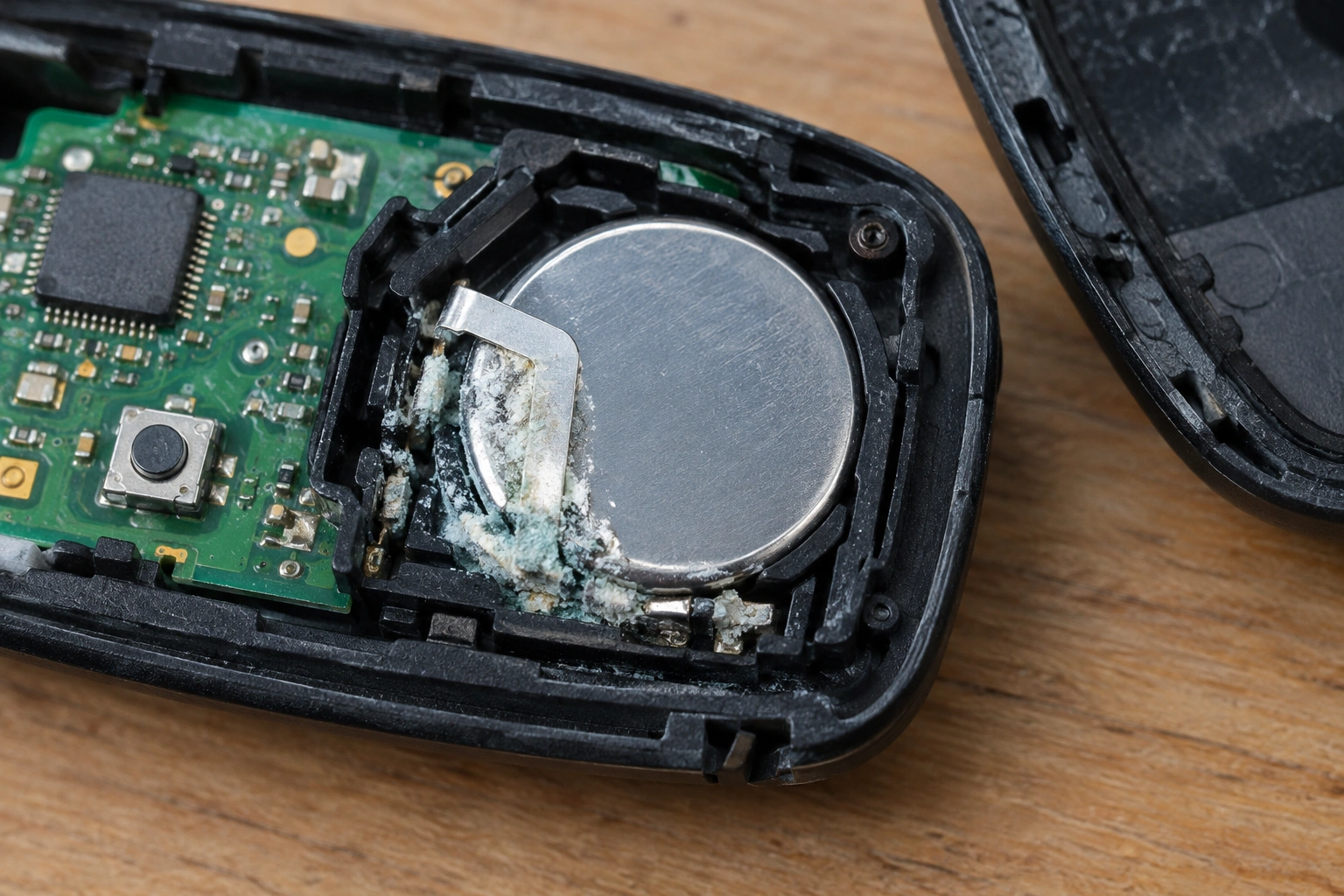
A key distinction matters here: plain dirt usually looks like dust, lint, or a thin film. Corrosion from battery leakage often looks powdery, crusty, or chalky, and it may spread onto the nearby plastic or circuit board. If you see that kind of residue, cleaning is still worth trying, but the battery should usually be replaced too.
If your fob has no visible residue and still fails after a battery swap, the issue may be elsewhere. For help with that next step, see our guide on key fob not detected after replacing the battery and key fob not detected but battery is new.
What You Can Safely Use to Clean Key Fob Contacts
For light cleaning, the safest tools are simple:
- A cotton swab
- A microfiber cloth
- Isopropyl alcohol
- Optional residue-free electronics contact cleaner made for delicate components
Isopropyl alcohol is the easiest starting point because it evaporates quickly and is commonly used for electronics cleaning. Use a small amount on the swab, not a soak. If you choose a contact cleaner, look for one labeled for electronics and residue-free so it is appropriate for delicate contacts and circuit boards.
What to avoid:
- Water, especially around the circuit board
- Abrasive pads or steel wool
- Metal tools that can gouge the contact surface
- Soaking sprays that leave liquid pooled inside the fob
Vinegar and baking soda are generally not recommended for key fobs. They can make sense in some larger battery-corrosion cleanup jobs, but key fobs are small, sealed, and easy to damage with excess liquid or residue. Unless a specific corrosion case calls for them and you can fully control application and drying, stick with isopropyl alcohol or a suitable electronics contact cleaner.
How to Open the Key Fob and Remove the Battery Safely
Take your time with the case. Most fobs are held together with small clips, a hidden seam, or a small screw. If you force the shell apart, you can crack the case or tear a seal that keeps moisture out.
Here’s the safer approach:
-
Find the seam or release point.
Look closely around the edge for a notch, button release, or screw. -
Use a small plastic pry tool if possible.
A plastic tool is less likely to mar the case than a metal blade. -
Open the shell gently.
If it resists, stop and check for a hidden screw instead of forcing it. -
Remove the coin-cell battery.
Note which side faces up before you lift it out. A quick phone photo helps. -
Set the battery aside.
If the battery looks swollen, wet, or crusted, replace it rather than reinstalling it.
Removing the battery first reduces the chance of shorting the fob while you clean. That matters because the contacts sit close to the circuit board, and a stray blob of liquid can cause trouble if the battery is still installed.
How to Clean Light Dirt and Residue
If the contacts just look dusty or slightly dull, keep the process simple.
-
Dampen a cotton swab with a small amount of isopropyl alcohol.
The swab should be moist, not dripping. -
Wipe the battery contacts gently.
Use light pressure and short strokes. You’re removing film, not polishing metal. -
Clean the battery itself if it is going back in.
Wipe the flat surfaces only if the battery is still healthy and not leaking. -
Use a dry microfiber cloth or dry swab to remove loosened residue.
This helps prevent leftover liquid from sitting in the compartment. -
Let the parts air-dry for a few minutes.
Even though alcohol evaporates quickly, give it time before reassembly.
This is the point where many fobs are saved. If the only issue was a thin layer of grime or oxidation, a gentle wipe can restore solid contact without any drama.
How to Remove White or Green Battery Corrosion
Corrosion needs a little more care because the residue can spread and the metal can be damaged underneath it.
White powder usually points to battery leakage. Green residue often means the contact metal has started to oxidize or corrode. In both cases, the goal is to remove loose buildup without scraping away the contact surface.
Here’s the safer method:
-
Remove the battery and inspect the compartment under good light.
Look for residue on the contact tabs, springs, and nearby plastic. -
Use a cotton swab lightly dampened with isopropyl alcohol.
Wipe the residue instead of scrubbing hard. -
If the buildup is stubborn, use a residue-free electronics contact cleaner.
Choose a product made for delicate electrical parts, apply only a small amount, and follow the label directions. -
Clean the surrounding area too.
Corrosion can spread beyond the exact spot where the battery sits. -
Avoid aggressive scraping unless the corrosion is light and localized.
If the metal is already thin or pitted, scraping can make it worse.
A useful comparison: light cleaning handles dust and mild oxidation; corrosion removal is about clearing leakage residue without damaging what’s left of the contact. If the contact metal still looks smooth after cleaning, you’re probably in good shape. If it looks eaten away, cleaning may only buy you time.
Dry, Inspect, and Decide Whether the Contacts Are Still Usable
Do not rush reassembly.
Let the fob dry completely before putting the battery back in. For a light alcohol cleaning, a few minutes may be enough. If you used more cleaner or had visible corrosion, give it longer and make sure there is no trapped moisture in the battery pocket or around the circuit board.
Now inspect the contacts closely:
- Are they bent out of shape?
- Is the metal pitted or rough?
- Is any contact missing or broken?
- Does the spring still press firmly against the battery?
This inspection tells you whether cleaning solved the problem or only exposed damage that was already there. A contact that is shiny but slightly dirty is salvageable. A contact that is thin, missing metal, or no longer presses on the battery may need replacement or a different repair.
Reinstall the Battery and Reassemble the Key Fob
Put the battery back in the same direction it came out. The positive and negative sides matter, and coin-cell batteries are easy to flip by mistake.
Before closing the shell:
- Make sure the battery sits flat in its holder.
- Check that any rubber seal is seated correctly.
- Confirm that no swab fibers or debris are left inside.
- Align the case halves carefully before pressing them together.
If the shell has clips, press it together evenly rather than snapping one side first. If it has a screw, tighten it snugly but do not overdo it.
This is also a good time to replace the battery if it is old or questionable. If you found leakage or corrosion, install a fresh battery after the contacts are cleaned and the compartment is fully dry.
Test the Fob and Troubleshoot If It Still Does Not Work
Test the buttons right away. Stand near the vehicle first, then step back a little to check range.
If the fob still fails:
-
Recheck battery orientation.
A flipped coin-cell battery is one of the easiest mistakes to miss. -
Confirm the battery is actually fresh.
A new battery from a bad batch or one that sat in a drawer too long can still disappoint. -
Look again at the contacts.
If one side barely touches the battery, the fob may work only intermittently. -
Try the spare key fob if you have one.
That helps separate a fob problem from a vehicle-side issue. -
If corrosion was severe, inspect for damage near the circuit board.
Leakage can travel farther than it first appears.
If the fob works only when pressed hard, the contact pressure may still be weak. If it does nothing at all after cleaning and a fresh battery, the problem may be beyond simple contact cleaning.
For related troubleshooting, our posts on key fob range problems after battery replacement can help you sort out whether the issue is the fob, the battery fit, or something else.
When to Replace the Battery, Contacts, or Entire Key Fob
Here’s the simple decision rule I use:
- Replace the battery if it is old, weak, or shows leakage.
- Clean the contacts if the residue is light to moderate and the metal still looks solid.
- Replace or repair the contact assembly if the metal is pitted, bent, or broken.
- Replace the entire fob if corrosion has reached the circuit board or the shell is damaged beyond a clean repair.
DIY cleaning makes sense when the problem is limited to residue and light corrosion. Once the contact metal is missing or the board is damaged, cleaning is no longer the fix. At that point, the better move is usually replacement or professional repair.
A damaged rubber seal or gasket is another reason to be cautious. If the fob no longer closes tightly, or the seal is torn and cannot keep moisture out, it should not be reused as-is because new corrosion can return quickly.
When to Consult a Locksmith
Call a locksmith if the fob still does not work after a careful cleaning, a fresh battery, and a recheck of the contacts. A locksmith is especially appropriate when the fob case cannot be opened safely, the contacts are too damaged to hold the battery securely, or corrosion has leaked onto the circuit board. If the shell is cracked, the clips are broken, or a seal or gasket no longer closes properly, professional repair or replacement is often the safer option.
FAQ
Can I use vinegar or baking soda on key fob contacts?
I would avoid them unless you’re dealing with a very specific corrosion problem and you understand the risks. Those methods are more common for larger battery terminals than for small, delicate key fobs. Isopropyl alcohol or an electronics contact cleaner is the safer first choice.
How long should I let the key fob dry?
Let it dry completely before reinstalling the battery. Light alcohol cleaning may dry quickly, but if you used more cleaner or had corrosion, give it extra time and make sure there is no trapped moisture.
Should I replace the battery after cleaning the contacts?
If the battery is old, weak, or shows any sign of leakage, yes. Cleaning the contacts without replacing a questionable battery often means you’ll be back inside the fob again soon.
What if the contacts look rusty or eaten away?
That usually means the damage goes beyond surface dirt. If the metal is pitted, thin, or missing, cleaning may not restore reliable contact. Replacement or repair is often the better option.
Why does my fob still not work after cleaning?
The battery may be weak, installed backward, or incompatible. The contacts may also be too damaged to hold a solid connection. If cleaning and a fresh battery do not fix it, the problem may be deeper than the battery compartment.
Is contact cleaner better than alcohol?
Not always. For light dirt, isopropyl alcohol is usually enough and easy to control. Contact cleaner can help with stubborn residue, but it is not automatically better for every fob.
Final check before you close it up
If the contacts are clean, dry, and still springy, you’re in good shape. If the metal is damaged or the residue keeps coming back, stop there and move to replacement instead of forcing a repair that won’t last.
