
LAUNCH X431 CRP919E Lite Review: Worth It in 2026?

The LAUNCH X431 CRP919E Lite is a 7-inch diagnostic tablet with full-system scanning, service resets and bidirectional active tests. It suits advanced DIY users and independent technicians who need to command components during troubleshooting. It goes far beyond a basic code reader, so check coverage and update terms first.
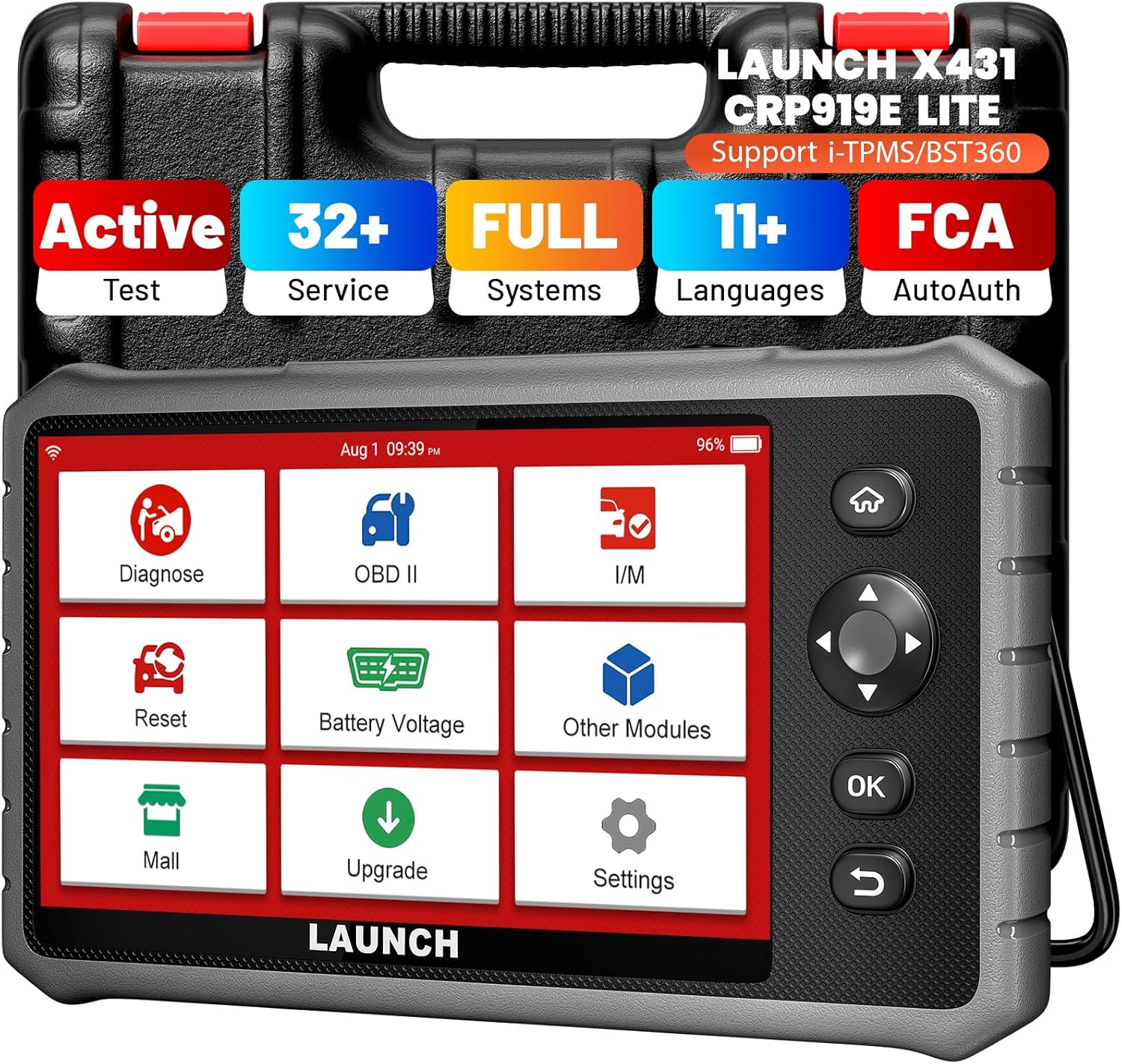
The LAUNCH X431 CRP919E Lite is a 7-inch automotive diagnostic scan tool built for full-system fault diagnosis, service functions, and bidirectional component testing. Its primary use is helping advanced DIY users and independent technicians diagnose vehicle modules and actively command supported components during troubleshooting.
This LAUNCH X431 CRP919E Lite review focuses on the functions that materially separate it from simpler OBD2 readers. It sits above basic four-system scanners by combining broader system access, live data, active tests, reset functions, diagnostic reports, and vehicle-specific software in one tablet-style tool.
🏆 My Quick Verdict
💡 Best For: Advanced DIY mechanics and independent technicians who need full-system diagnostics plus bidirectional testing.
⚡ Key Specs:
7-inch touchscreen, 2GB RAM, 32GB storage, 9–18V OBDII input, full-system diagnostics, active tests, Wi-Fi updating, and vehicle battery-voltage monitoring.
✅ Bottom Line: The CRP919E Lite provides substantially deeper diagnostic capability than an ordinary code reader. Its main limitation is that individual active tests, resets, and module coverage remain vehicle-specific, so compatibility should be confirmed before purchase.
At a Glance
- Full-system diagnostics provide much broader access than an engine-only OBD2 reader.
- Bidirectional testing can command supported components during fault isolation.
- The 7-inch touchscreen gives live data and diagnostic menus useful working space.
- Reset and relearn availability varies by vehicle make, model, year, and installed systems.
- Wi-Fi supports software updates and diagnostic-report workflows.
- Its 32GB storage provides room for diagnostic software and saved records.
Premium Specifications
| Specification | Verified Detail |
|---|---|
| Display | 7-inch touchscreen |
| Memory | 2GB RAM |
| Storage | 32GB ROM |
| OBDII Input | 9–18V |
| Diagnostics | Full vehicle-system diagnostics on supported applications |
| Active Testing | Bidirectional control on supported vehicles |
| Connectivity | Built-in WLAN for updates and data functions |
| Net Weight | Less than 980g |
| Operating Temperature | 0°C to 50°C |
| Manufacturer Manual Warranty | One year against defects in materials and workmanship |
Design & Build Quality
The CRP919E Lite uses a tablet-style design centered around its 7-inch touchscreen and physical navigation controls. At under 980g, it remains portable enough for regular garage use without becoming a full-size workshop tablet.
The diagnostic connection uses the tool’s dedicated connector and the vehicle’s 16-pin diagnostic port. A carrying bag is listed among the standard reference accessories, which makes storage easier between jobs.
Setup, Installation & Ease of Use
- Charge the scan tool before completing its first-time configuration.
- Select the preferred language and time zone during initial startup.
- Connect the tool to Wi-Fi so software and diagnostic applications can be updated.
- With ignition off, connect the diagnostic cable securely to the vehicle’s diagnostic port.
- Turn the ignition on before starting the appropriate diagnostic session.
- Keep the scanner and cable stored dry and protected when not in use.
Core Performance & Feature Breakdown
The CRP919E Lite’s biggest performance advantage is access to electronic systems beyond the powertrain. Depending on the vehicle, this can include modules such as engine, transmission, ABS, SRS, body electronics, climate control, and other available controllers.
Reading codes is only the beginning. The scanner can also display ECU information and live-data streams, letting technicians compare sensor values and operating conditions instead of diagnosing from a trouble code alone.
Expert Insight
Bidirectional control is most valuable when a code identifies a circuit but not the failed component; commanding a fan, lock, throttle-related actuator, or other supported device can help separate wiring, control, and component faults.
Service functions add another layer of usefulness after repairs. The model is commonly sold with numerous reset and relearn functions, but buyers should never assume every advertised function works on every vehicle.
Key Features Explained
Full-System Diagnostics
Full-system scanning lets the CRP919E Lite communicate with available electronic control modules rather than limiting diagnosis to engine emissions. This matters when warning lights or faults originate in braking, restraint, transmission, body, or comfort systems.
Bidirectional Active Tests
Bidirectional control sends diagnostic commands from the scanner to supported vehicle components. It can reduce guesswork because a technician can request an action and observe whether the vehicle responds correctly.
Reset and Relearn Functions
Reset functions support maintenance and post-repair procedures such as selected service resets, adaptations, and relearns. Coverage is software-dependent, so checking the exact vehicle and desired function remains essential.
Diagnostic Records and Reports
The Data area can retain diagnostic reports and records for later review. That is especially useful when comparing before-and-after scan results or documenting faults for a customer.
Real-World Usability & Maintenance
The large touchscreen makes lengthy diagnostic sessions easier than working from a small handheld code reader. Wi-Fi also lets the scanner obtain software updates without transferring files manually.
Keep the housing dry and clean, and use a mild detergent on a clean cloth when needed. LAUNCH also warns against disconnecting diagnostic equipment while the ignition is on or the engine is running.
For simpler diagnostics, a lower-cost tool may be enough; the LAUNCH CRP123I V3.0 Elite review shows how a four-system scanner differs from this more advanced category.

Pros & Cons
Pros
- Full-system diagnostics provide substantially broader troubleshooting access.
- Bidirectional tests can speed up supported component diagnosis.
- The 7-inch touchscreen is practical for live data and longer sessions.
- Saved diagnostic information is useful for repair documentation.
Cons
- Function coverage varies substantially between vehicles.
- Its 2GB RAM and 32GB storage are modest by newer tablet standards.
- Buyers needing only check-engine diagnosis may be paying for unused capability.
Common Issues & Fixes
The Scanner Does Not Identify the Vehicle Automatically
Automatic identification can vary by vehicle and software coverage. Use manual vehicle selection and confirm the diagnostic application is updated.
A Listed Reset or Active Test Is Missing
Not every function is available on every vehicle configuration. Verify coverage for the exact year, model, engine, and control module before assuming a scanner fault.
Software Will Not Update
Updates require a stable network connection. Reconnect to Wi-Fi, confirm network access, and restart the update process without interrupting power.
What to Know Before You Buy
Compatibility matters more than the total number of functions printed in a product listing. Confirm that your exact vehicle supports the system, active test, or relearn procedure you intend to use.
The included software structure may also distinguish basic diagnostic coverage from optional expanded functionality. Buyers considering LAUNCH versus another ecosystem can read our Autel scanner vs LAUNCH scanner comparison before committing.
Who Should Buy It / Who Should Skip It
✅ Who Should Buy It
- Advanced DIY owners maintaining several vehicles.
- Independent technicians who need active tests.
- Buyers moving beyond basic four-system scanners.
- Users who frequently perform maintenance relearns and resets.
✗ Who Should Skip It
- Drivers who only need check-engine code reading.
- Users unwilling to verify vehicle-specific compatibility.
- Buyers requiring guaranteed coverage for one specialized programming job.
Alternatives to Consider
Autel MaxiCOM MK808S
Best For: Buyers who prefer Autel’s diagnostic ecosystem and newer tablet hardware.
Main Advantage: Full-system diagnostics and bidirectional active tests with 64GB onboard storage.
Trade-off: Its wired vehicle connection may be less convenient than wireless alternatives.
Key Spec: 7-inch 1024×600 touchscreen with Android 11.
TOPDON ArtiDiag900 Lite
Best For: Users who prioritize a larger display and wireless diagnostic interface.
Main Advantage: Its 8-inch tablet and Bluetooth VCI create a more spacious workshop interface.
Trade-off: Its feature set and coverage still need vehicle-specific verification.
Key Spec: 8-inch 1280×800 display, Android 11, 2GB RAM, and 32GB storage.
Is It Worth It?
The CRP919E Lite makes the most sense when you will genuinely use full-system scanning, live data, service functions, and bidirectional controls. Those capabilities can save diagnostic time compared with repeatedly replacing parts based only on fault codes.
For a single occasional check-engine light, it is more tool than most owners need. For a serious home garage or independent repair workflow, its broader diagnostic depth makes the purchase easier to justify.
Final Verdict
The LAUNCH X431 CRP919E Lite is a capable step-up scanner for buyers who have outgrown basic OBD2 and four-system diagnostic tools. Choose it for full-system troubleshooting and active testing, but verify the exact vehicle functions you need before buying.
Frequently Asked Questions
Does the LAUNCH X431 CRP919E Lite work with every vehicle?
No, individual functions are vehicle-dependent. It is designed for OBDII-compliant vehicles and broader manufacturer-specific diagnostics, but module access, resets, and active tests vary by application.
Does the CRP919E Lite support bidirectional control?
Yes, the CRP919E Lite supports bidirectional active testing on compatible vehicles. Available commands depend on the vehicle and control module.
How large is the CRP919E Lite screen?
The scanner uses a 7-inch touchscreen. That provides considerably more viewing space for diagnostic menus and live data than small handheld readers.
Does it have service reset functions?
Yes, service, reset, coding, and relearn functions are part of the scanner’s diagnostic platform. The exact procedures available must be checked for the specific vehicle.
What maintenance does the scanner need?
Keep the tool dry, clean, charged, and updated. Avoid harsh cleaners and protect its diagnostic cable from excessive bending or damage.
What warranty does the CRP919E Lite have?
The LAUNCH manual states a one-year warranty against defects in materials and workmanship from delivery to the user. Seller-specific promotions can differ, so confirm the warranty terms offered by the retailer before purchasing.
Affiliate disclosure: replacekeyfob.com earns a small commission when you purchase through links on this page — at no extra cost to you. Our editorial process is independent: affiliate relationships never influence which products we recommend or how we rank them.