
Nissan Key Fob Not Working? A Practical Troubleshooting Guide

If your Nissan key fob suddenly stops unlocking the doors, starting the car, or triggering the panic button, don’t assume the whole unit is dead. In a lot of cases, the fix is simple: a weak coin-cell battery, a dirty contact, or a car-side issue that looks like a fob problem.
Quick diagnosis: what the symptom usually means
A few symptom patterns can point you in the right direction fast:
- Buttons work only sometimes: usually a weak battery, worn button contacts, or a fob that’s starting to fail.
- The fob works very close to the car, but not at normal range: often a weak fob battery.
- The car says “No key detected”: could be the fob battery, but it can also be the vehicle battery, receiver, or a programming issue.
- One Nissan fob works and the spare does not: that points more toward the bad fob than the car.
- Neither fob works: suspect the car battery, a receiver issue, or something affecting the vehicle side.
A useful rule of thumb: if the fob still does something, even weakly, the battery is still on the suspect list. If it stopped after being dropped, exposed to water, or crushed in a pocket, physical damage moves higher on the list.
No key detected: quick troubleshooting flow
If your Nissan shows “No key detected,” use this short order of checks before replacing parts:
- Try the spare fob.
- If the spare works, the issue is probably the original fob.
-
If both fail, move to the car-side checks.
-
Check the fob battery.
- A weak coin-cell battery is a common cause.
-
If the fob has never had a battery change, start here.
-
Check the car battery.
-
If the vehicle battery is weak or recently went dead, the car may not read the fob reliably.
-
Look for physical damage.
-
Cracks, water exposure, or sticky buttons can point to a damaged fob.
-
Try the emergency start method.
- If the car starts with the backup method, the problem is more likely the fob battery or recognition issue than a complete fob failure.
The most likely causes, from easiest to hardest
When a Nissan key fob not working complaint comes in, the usual causes are easiest to sort out in this order:
1) Weak or dead fob battery
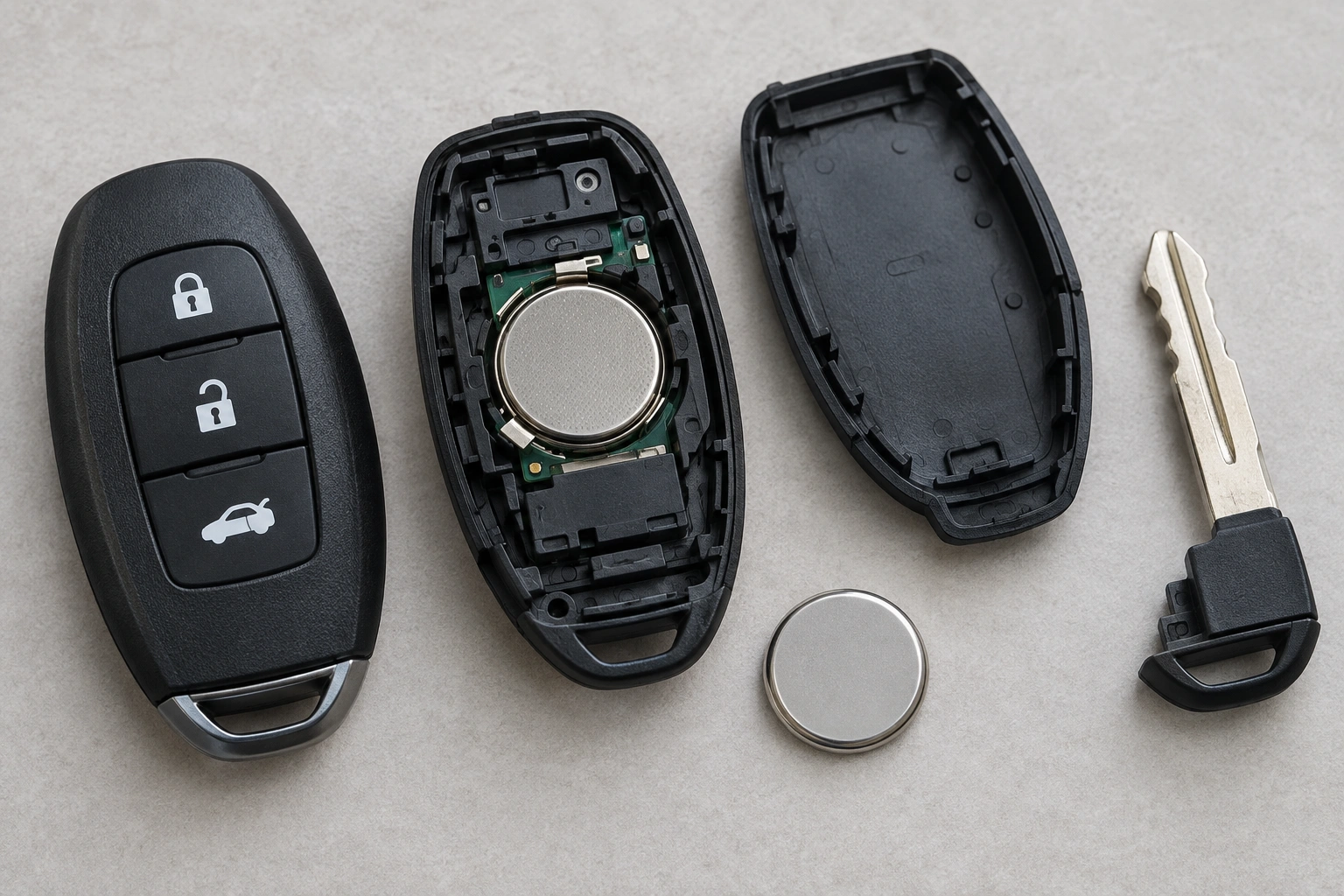
Most Nissan key fobs use a coin-style battery, often a CR2032 or CR2025. A battery swap is usually the first thing to try.
2) Signal interference or distance issue
A fob that only works right next to the car may be struggling with a weak battery or interference from another electronic device nearby. Parking structures, other keyless systems, and even a crowded key ring can sometimes make the problem seem worse than it is.
3) Damaged fob
If the case is cracked, buttons feel mushy, or the fob got wet, the internal board or contacts may be damaged. Battery replacement won’t fix that.
4) Vehicle-side issue
If both the main fob and the spare fail, the problem may be the car battery, the intelligent key receiver, or another vehicle-side fault. That’s especially true when the dash shows a key warning but the fobs themselves seem intact.
Check the key fob battery first
This is the fastest and cheapest place to begin.
If the battery is old, the fob has to be pressed repeatedly, or the range has dropped off, replace the battery before you do anything else. On many Nissan key fobs, that means a CR2032 or CR2025 coin cell.
Signs the battery is the problem
- The lock/unlock buttons work inconsistently.
- You need to stand unusually close to the car.
- The car starts acting up only after the fob has been in use for a long time.
- The spare fob works better than the main one.
A simple test before you buy parts
If you have a spare key fob, compare behavior. If the spare works normally and the main fob does not, the battery or electronics in the main fob are the likely problem. If both fobs act weak, the issue may be with the car or the environment around it.
Battery replacement and reprogramming
In many cases, replacing the battery does not require reprogramming. That said, some Nissan models may need a resync or may behave oddly after the battery has been dead for a while. If the fob still isn’t recognized after a fresh battery, move to the next checks rather than assuming the battery swap was enough.
How to replace the Nissan key fob battery
The exact fob design varies by model, but the general process is similar on many Nissan smart keys.
What you’ll need
- The correct replacement battery, usually CR2032 or CR2025
- A small flat tool or the mechanical key
- Clean, dry hands
Basic replacement steps
- Remove the mechanical key from the fob if your model has one.
- Gently pry open the case using the mechanical key or a small flat tool.
- Remove the old battery carefully.
- Install the new battery with the positive (+) side facing up, which is the orientation commonly used in Nissan fobs.
- Snap the case back together and reinstall the mechanical key.
- Test the buttons from a normal distance.
Do not force the case apart. If the shell cracks or the battery contacts bend, you can turn a simple battery job into a bigger repair.
What not to do
- Don’t use a battery that’s the wrong size.
- Don’t touch the contacts more than necessary.
- Don’t assume a fresh battery guarantees the fob is fixed.
If the new battery solves the problem, great. If not, the battery was only part of the story.
If the battery is good but the fob still fails
At this point, you’re looking at a deeper issue.
Try the spare fob
This is the fastest way to separate a fob problem from a car problem. If the spare works and the original does not, the original fob may need repair or replacement.
Check for worn buttons or water damage
A button that feels soft, sticky, or uneven can point to internal wear. Water damage often shows up as erratic operation, complete failure, or corrosion inside the case. Once the electronics are damaged, battery replacement usually won’t solve it.
Consider resyncing or reprogramming
Some Nissan fobs may need reprogramming if the battery was completely dead for a while, if the fob lost sync, or if the vehicle is no longer recognizing it. This is one of those situations where a locksmith or dealer can save time, especially if you don’t want to guess through a model-specific procedure.
For general Nissan troubleshooting and broader key-fob issues, our related guides on the key fob lock button not working and key fob unlock button not working can help you narrow down whether you’re dealing with a single button, the battery, or the whole fob.
How to start a Nissan when the key fob battery is dead
If your Nissan has push-button start, a dead fob battery does not always mean you’re stranded.
Many Nissan push-button start systems have a backup start method that uses the fob’s internal transponder. The common approach is to hold the fob directly against the start/stop button or place it in the specific sensing area the vehicle uses, then press the brake and start the car as usual. The exact placement and sequence can vary by model, so check your owner’s manual for the precise procedure for your vehicle.
If the car still won’t start with that backup method, the issue may be more than a dead fob battery.
Check whether the problem is actually the car
This is the step people skip most often.
Signs the car may be the issue
- Both key fobs fail at the same time.
- The dash repeatedly shows “No key detected.”
- The car battery is weak or recently went dead.
- The fob works in some situations but not others, and the behavior changes with the vehicle’s electrical state.
If the buttons on the fob still work but the car says “No key detected,” the problem may be on the vehicle side, the fob may need to be resynced, or the fob battery may be too weak for reliable recognition. If the car battery is suspect, check that first before replacing more key fob parts.
For a broader look at vehicle keyless-entry and safety-related system behavior, the NHTSA homepage is a useful place to start for official consumer safety information.
When to repair, reprogram, or replace the key fob
Here’s the practical decision tree to use.
Replace the battery if:
- The fob is intermittent.
- Range has dropped.
- The battery is old or unknown.
- The fob has never had a battery change since you bought the car.
Reprogram the fob if:
- The battery is new, but the car still does not recognize it.
- The buttons work, but the vehicle says no key is detected.
- The fob seems intact and dry, but it lost sync.
Replace the fob if:
- The case is cracked and the board may be damaged.
- The fob has water damage or corrosion.
- Buttons are worn out or physically broken.
- Reprogramming and battery replacement both fail.
A replacement fob is usually the right call when the electronics are clearly damaged. Reprogramming is the better move when the fob itself still has a good chance of being healthy.
Dealer vs locksmith vs DIY: which fix makes the most sense?
DIY
Best for battery replacement and basic inspection. It’s the cheapest path, but it stops being useful once programming or internal repair is involved.
Automotive locksmith
Often the best middle ground. A locksmith can usually help with testing, programming, and replacement without the dealership wait. For many common fob problems, this is the most cost-effective option if you need more than a battery swap but want to avoid dealer pricing and delays.
Dealer
Best when the vehicle needs model-specific programming or you want OEM parts and factory procedures. The trade-off is usually higher cost and more time.
If the issue is only a dead battery, DIY is usually the best choice. If the fob needs programming or the original is damaged, a locksmith is often the better balance of cost and convenience. Choose the dealer when you specifically need OEM parts, factory-level procedures, or the vehicle setup is not responding to other options.
If you’re weighing your options for a replacement fob, it can help to compare them against a broader view of keyless-entry systems and vehicle ownership costs. Consumer auto sites like Edmunds and Car and Driver can be useful for general ownership guidance, but for the fob itself, a locksmith or dealer is usually the more direct path.
When to consult a locksmith
Call a locksmith if:
– the battery is new and the fob still won’t work,
– the spare fob works but the original does not,
– the car says no key detected after a battery swap,
– or the fob needs programming you can’t complete at home.
That’s the point where guessing gets expensive. A locksmith can usually tell you quickly whether the issue is the fob, the car, or the programming.
Final check before you buy a new fob
If your Nissan key fob not working problem is caused by a weak battery, you may be back on the road in minutes. If the battery is fine, use the spare fob, check the car battery, and confirm whether the vehicle recognizes the emergency start method. If the same symptoms persist after those checks, replace the fob or have it programmed instead of continuing to swap batteries.
FAQ
Do I need to reprogram my Nissan key fob after changing the battery?
Usually no, but some Nissan models may need a resync or may act up after a long battery failure.
What battery does a Nissan key fob use?
Many Nissan fobs use a CR2032 or CR2025 coin-cell battery, but the exact type depends on the model and fob design.
Why does my Nissan say “No key detected” even though the fob buttons work?
That can point to a weak fob battery, a vehicle battery issue, a receiver problem, or a sync issue between the fob and the car.
Can I start a Nissan with a dead key fob battery?
Often yes, if your model has a push-button start backup method. Check the owner’s manual for the exact placement and steps.
Should I go to a locksmith or a dealer for a Nissan key fob problem?
A locksmith is often the more cost-effective choice for testing, replacement, and programming. A dealer is usually better when you need OEM parts or model-specific factory procedures.
