
Only One Key Fob Button Works? Here’s How to Diagnose It and Fix the Right Thing

If one button on your key fob still works and the others do nothing, that pattern usually tells you something useful: the fob is not necessarily “dead.” In many cases, the battery still has enough power to transmit, but one button, its contact, or the rubber pad above it has worn out.
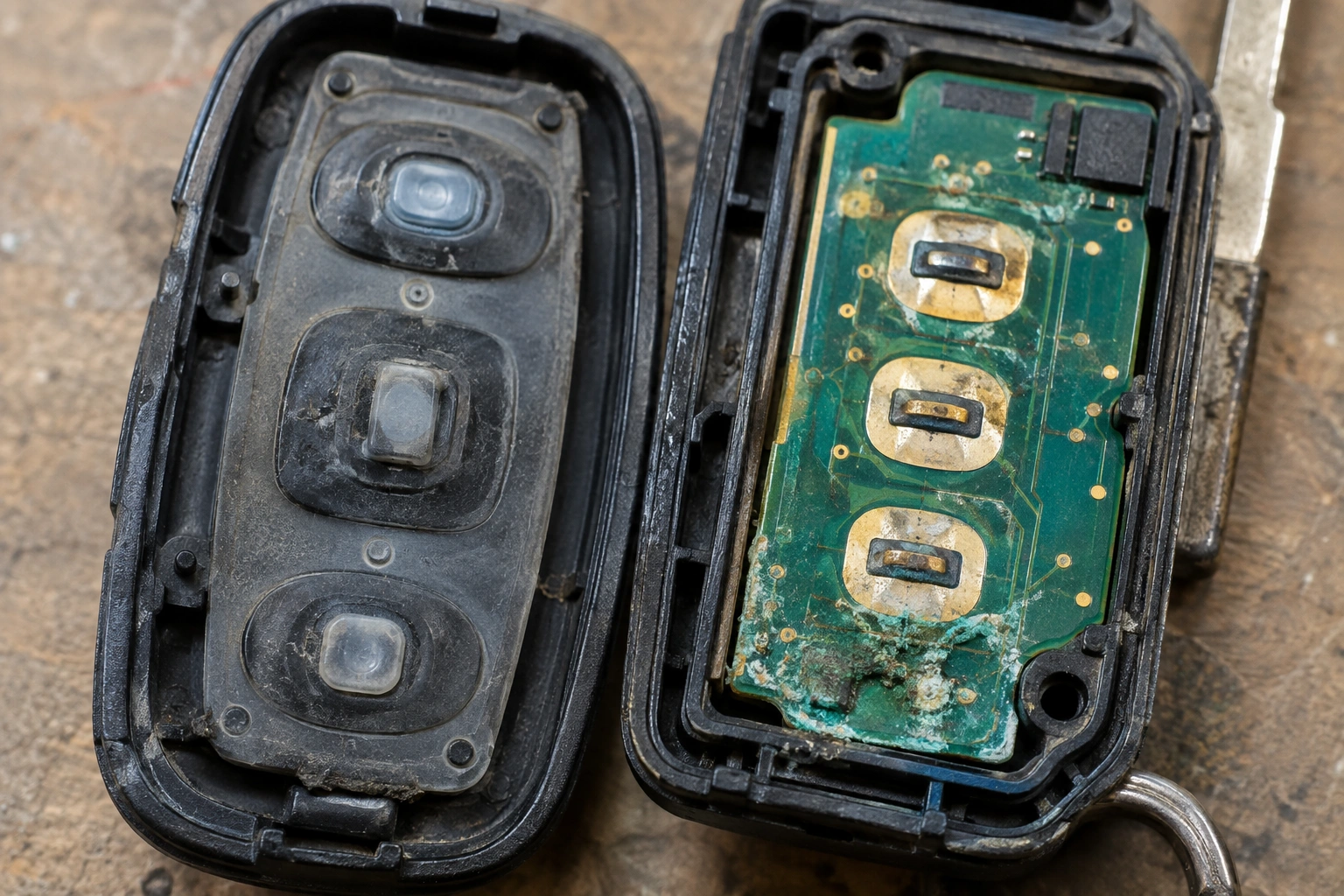
That matters because the fix can be very different depending on the symptom. A weak battery often affects the whole fob. A single dead button more often points to a physical problem inside the remote.
Quick Diagnosis: What One Working Button Usually Means
Think of the fob as a small transmitter with separate button contacts. When you press lock, unlock, panic, or trunk release, each button completes a circuit on the printed circuit board (PCB). If only one of those circuits works, the battery may still be fine while one button path has failed.
Here’s the practical rule I use first:
– One button works normally, others are dead → suspect worn button pad, dirty contact, cracked case, or board damage.
– All buttons are weak or intermittent → battery, corrosion, or transmitter issue becomes more likely.
– A button works only when pressed hard or from a certain angle → that usually points to a contact alignment problem or a worn rubber pad.
A simple no-tools check can help confirm whether the fob is transmitting at all: use your phone’s camera or a known RF tester if you have one. On many fobs with an infrared LED, the camera may show a flash when you press a button. If you see a signal on the tester or camera but only one button fails, the fob is usually transmitting and the problem is more likely limited to that button, its contact, or the rubber pad. If you see no signal from any button, the issue is usually broader than a single button failure.
A key fob can also still start the car even if one remote button fails, because the immobilizer transponder and the remote buttons are not always the same system. So don’t assume the whole fob is finished just because one function stopped.
Check the Symptom Pattern Before You Open the Fob
Before you pry the case apart, do a few simple checks. The pattern of failure often narrows the cause faster than opening the remote right away.
Note which button still works
If the lock button works but unlock doesn’t, that’s a strong clue the problem is inside the fob rather than in the car. If the panic button works from far away but the unlock button only works up close, the battery may still be okay, but the failing button may have a weak contact.
See whether the failed button is intermittent
Press the button several times in a row. If it works once in ten tries, or only after you squeeze the case, the issue is probably mechanical. A loose internal contact, worn rubber pad, or cracked solder joint can behave that way.
Test it at different distances
Stand next to the car and try each button. Then step back a few feet and try again. If the working button behaves normally but the broken one never responds, that again points to a button-specific issue rather than a battery problem.
Compare with your spare fob if you have one
If a second known-good fob works normally from the same spot, the vehicle receiver is probably not the main problem. That simple comparison saves a lot of guesswork.
For a deeper look at range and location-related symptoms, see why a key fob only works sometimes and why a key fob works near the driver door only.
Most Likely Causes, From Most to Least Common
1. Worn rubber button pad
The rubber pad above the button can wear down over time. If the pad no longer presses the contact firmly, the button may feel normal but fail to transmit. This is especially common on keys that get used every day, stuffed in pockets, or exposed to heat.
A classic example: the lock button still clicks, but unlock only works if you press dead center and push harder than usual. That often means the pad is no longer lining up with the contact properly.
2. Dirty or damaged button contact
Inside the fob, each button usually presses on a small contact area on the PCB. Dirt, grime, or worn material can keep that contact from closing reliably. If the button works after repeated presses, the contact may be marginal rather than completely broken.
3. Corrosion or moisture damage
If the fob got wet, sat in a damp pocket, or has visible greenish or white residue inside, corrosion may be affecting one section of the board. Water damage does not always kill every function at once. One button can fail while another still works.
4. Battery issue
A weak battery often affects the whole fob, not just one button. Still, a low battery can make an already marginal button seem worse. If the fob is old, the battery is easy to rule out early.
5. PCB damage
A cracked board, broken trace, or damaged solder joint can stop one button circuit from working. This is more likely if the fob has been dropped, stepped on, or squeezed in a tight spot.
6. Vehicle receiver problem
If multiple known-good fobs act strangely, the car’s receiver or related system may be the issue. But if only one fob has one dead button, the problem is usually in the fob itself.
Step-by-Step Fixes You Can Try at Home
1. Replace the battery if it’s due anyway
If the battery is old, weak, or you’ve noticed shorter range, replace it first. That is the fastest low-risk test. Just make sure the new battery is installed with the correct polarity and seated firmly.
A battery swap is worth trying if:
– the fob works only very close to the car,
– multiple buttons are weak,
– or the fob stopped acting right after a battery warning.
If only one button is dead and the others work normally, don’t expect the battery to solve everything. But it’s still a sensible first check if the battery is old.
2. Reseat the battery and inspect the contacts
Open the fob carefully and look for bent battery clips, dirt, or oxidation. Reseat the battery so it makes solid contact. Sometimes a battery that looks fine is not actually sitting properly in the holder.
Avoid forcing the case apart. A cracked shell can make the button alignment worse.
3. Inspect the button pad and board
Look closely at the rubber button pad and the PCB under it. You’re checking for:
– worn or flattened rubber,
– dirt on the contact points,
– corrosion,
– cracks in the shell,
– or obvious damage to the board.
If the pad looks torn or compressed, that’s a strong sign the button itself is the problem.
4. Clean the contact area carefully
If you see light residue or grime, clean it gently with a small amount of electronics-safe cleaner or isopropyl alcohol on a swab. Use very little liquid. You want to remove contamination, not soak the board.
Let everything dry fully before reassembling. Excess moisture can make the problem worse.
5. Reassemble and test each button
After cleaning or reseating the battery, put the fob back together and test every button. Don’t skip this step. A repair that looks promising on the bench can still fail once the shell is closed if the pad is misaligned.
How to Tell Whether the Problem Is the Fob or the Car
This is the part that saves people the most time.
Use a second fob if you have one
If the spare fob works normally from the same distance, the car is probably fine. That means your original fob needs repair, reprogramming, or replacement.
Watch for inconsistent response across all remotes
If both fobs act up in the same way, especially close to the car, the receiver or vehicle-side issue moves higher on the list. If only one fob has the problem, stay focused on the fob.
Pay attention to the pattern
A vehicle receiver problem usually does not depend on which button you press, though some vehicles can have button-specific function or mapping issues. A button-specific failure does. That distinction is one of the clearest clues you can get without tools.
For broader receiver-versus-fob troubleshooting, Edmunds’ car key and remote guidance and Car and Driver’s practical ownership advice can be useful starting points.
When Reprogramming Might Help—and When It Won’t
Reprogramming can help if the fob lost synchronization after a battery change, a reset event, or a repair that opened the remote. It can also be worth trying if all remote functions stopped working at once and the battery is known to be good. That said, reprogramming is not a cure for a physically broken button.
Use this rule:
– Try reprogramming if the fob was working before, then stopped after a battery change, a reset event, or a period where all buttons failed together.
– Do not expect reprogramming to fix a worn button pad, corroded contact, cracked board, or damaged shell.
If one button still works, the fob is at least transmitting something. That makes a pure programming loss less likely than a hardware issue. If only one button is dead while the others still work normally, reprogramming is usually not the first thing to try. Check your owner’s manual or a dealer or locksmith source for the correct procedure for your vehicle rather than guessing.
Repair vs Replace: Which Option Makes More Sense
Repair the existing fob if:
- the case is intact,
- the board looks clean,
- the problem seems limited to a worn button pad or contact,
- and the fob still has solid range on the working button.
In that situation, a shell replacement or button pad repair may be enough.
Replace the full fob if:
- the PCB is corroded,
- the fob has obvious water damage,
- the board is cracked,
- or the case is so worn that the buttons no longer align correctly.
A replacement can also make sense when the repair would take nearly as much time and money as a new unit, especially if the existing fob has multiple weak spots.
Trade-off to keep in mind
Repairing is usually the cheaper route, but replacement is often more reliable when the board or case is badly worn. If the fob has already failed once from damage, a fresh unit may save you from repeat trouble.
When to Consult a Locksmith
Call a locksmith or dealer if:
– the fob has severe corrosion,
– it was submerged or heavily water-damaged,
– the circuit board is cracked,
– the battery compartment is damaged,
– or you’ve already tried battery replacement and cleaning with no improvement.
A professional can also confirm whether the issue is in the fob, the programming, or the vehicle receiver. That matters when you’re down to one working remote and don’t want to guess wrong.
The National Highway Traffic Safety Administration has useful consumer information on vehicle safety systems and owner resources at NHTSA, which can help you find the right manufacturer guidance for your vehicle.
How to Prevent Other Buttons From Failing
Once you’ve fixed the problem, a few habits can help the other buttons last longer:
- Keep the fob dry and out of standing moisture.
- Don’t force sticky buttons; that can tear the pad faster.
- Replace a cracked shell before the buttons stop lining up.
- Avoid storing the fob where it gets crushed in a tight pocket or under heavy items.
- If the buttons start feeling mushy, inspect the case early instead of waiting for a full failure.
The goal is simple: keep the rubber pad, contact, and board from wearing out faster than they already will.
FAQ
Can a key fob battery cause only one button to stop working?
Usually, no. A weak battery more often affects all buttons or shortens range. If only one button fails, a worn pad, dirty contact, or board issue is more likely.
Will my car still start if one button on the fob is dead?
Often, yes. Many fobs use separate systems for remote functions and starting authorization. A dead lock or unlock button does not always mean the start function is gone.
Can I fix a broken key fob button myself?
Sometimes. If the issue is a worn shell, dirty contact, or loose battery, DIY repair may work. If the board is corroded or cracked, replacement is usually the better path.
Do I need to reprogram the fob?
Only if it lost sync or stopped working after a battery change or a reset event. Reprogramming will not repair a broken button contact or damaged PCB.
How do I know if the car receiver is the problem?
If a second known-good fob also fails, the vehicle side becomes more suspicious. If only one fob has one dead button, the problem is usually inside that fob.
Should I replace the whole fob or just the shell?
If the electronics still work and the shell is worn, a replacement shell or pad may be enough. If the board is damaged, replace the full fob.
Is it safe to open the key fob?
Usually yes, if you do it carefully and avoid shorting the battery or soaking the circuit board. If the fob is swollen, heavily corroded, or wet, handle it cautiously and consider professional help.
How do I know whether the battery is installed correctly?
Check the polarity marks in the battery tray and make sure the cell sits flat and secure. A battery that is slightly tilted or loose can cause confusing symptoms.
Can moisture make only one button fail?
Yes. Water intrusion and corrosion can affect one section of the board before others. That’s why a fob that got wet deserves a close inspection even if one function still works.
What if the button works only when I press hard?
That usually points to a contact or pad alignment issue, not a vehicle receiver problem. Inspect the rubber pad, case fit, and contact area first.
Final takeaway
If only one button works, don’t jump straight to a new battery or a new fob. Check the pattern first. In many cases, the problem is a worn button pad, dirty contact, or internal damage that affects just one circuit. That gives you a much better shot at fixing the right part the first time.
