
Key Fob Circuit Board Damage Symptoms: How to Spot PCB Problems Before Replacing the Fob

If your key fob has started acting strange, the battery is not always the whole story. A fob that works one minute, fails the next, or only responds after a hard press or a fresh battery can be pointing to trouble on the printed circuit board (PCB) inside.
That matters because circuit board damage can look a lot like a dead battery, worn buttons, or even signal interference. The good news is that you can narrow it down with a few simple checks before you spend money on a replacement.
What Key Fob Circuit Board Damage Usually Looks Like
A damaged key fob circuit board often causes erratic behavior instead of a clean on/off failure. The fob may lock the car but not unlock it. It may work only when you stand close to the vehicle. Or it may respond after you open the shell, wiggle the battery, or press the buttons harder than usual.
That kind of pattern is a clue. A dead battery usually makes the fob weak across the board: short range, delayed response, or no response at all. PCB damage is more likely to create uneven symptoms, especially if the board has cracked solder joints, corrosion, or a loose component.
One useful rule: if the fob behavior changes from day to day without any clear pattern, the battery is not the only thing I would suspect.
Symptoms That Suggest the Circuit Board Is Damaged
Here are the warning signs I would pay attention to first.
1. The fob works only sometimes
Intermittent operation is one of the strongest clues. If you press the button five times and get two responses, that can point to a failing internal connection, cracked solder joint, or corrosion on the board. If the problem is inconsistent even after a fresh battery, that makes board damage more likely than battery failure.
2. The buttons feel normal, but the fob does not respond
If the rubber buttons feel fine and the battery is fresh, yet the car still ignores the fob, the problem may be deeper than the button pad. The transmitter or board traces may be damaged.
3. You have to press very hard for it to work
That can happen when the button contacts or the board underneath them are worn or damaged. Sometimes the issue is the button pad itself, but if pressure changes the result, I would not rule out PCB damage.
4. The fob was dropped or rattles inside
A loose-feeling or rattling fob can mean internal parts have shifted or broken loose. Repeated drops can crack solder joints or dislodge small components. That is one of the clearer physical clues that the board may have taken a hit.
5. Batteries seem to die too quickly
A properly functioning key fob battery often lasts for a while, but the exact lifespan varies by fob type, usage, and battery quality. If you are replacing batteries much more often than expected, there may be an electrical short inside the fob. That does not prove the board is damaged, but it is a strong reason to inspect it closely. The same warning appears in this repair guide from Keyless Entry Remote.
6. The fob died after water exposure
Water and electronics rarely get along. If the fob got washed, soaked, or left in a wet pocket, corrosion can spread across the PCB and cause delayed, partial, or total failure. Green or white residue on the board is a bad sign.
How to Tell Circuit Board Damage Apart From a Dead Battery
This is where people waste the most time and money, so a comparison helps.
| Symptom | More likely battery issue | More likely circuit board damage |
|---|---|---|
| No response at all | Yes, especially if battery is old | Yes, if battery is fresh and symptoms persist |
| Weak range | Very common | Possible, but less typical |
| Works intermittently | Sometimes | Very common, especially if it changes with tapping, flexing, or battery movement |
| One button fails, others work | Less likely | Possible if that part of the board is affected |
| Battery dies unusually fast | Uncommon | Can point to a short inside the fob |
| Fob was dropped or got wet | Not the main cause | Strong clue |
| Works after battery replacement, then fails again | Possible if battery was bad | More suspicious for board-level trouble |
A simple battery swap is still the first move, because it is cheap and easy. But if a fresh battery does not change the behavior, or the fob works only in odd, inconsistent ways, the board deserves attention.
For a broader look at the “not detected” side of the problem, you may also find our guide on Key Fob Not Detected: How to Fix It and Get Your Car Started Again helpful.
Other Problems That Can Mimic PCB Damage
Not every bad fob has a damaged PCB. A few common issues can look similar.
Worn button contacts
If only one button acts up, the button pad or contact dome may be worn. That usually affects a specific function rather than the entire fob. If lock works but unlock does not, the board may be fine and the button contact may be the weak link.
Signal interference
Sometimes the fob is fine, but the environment is not. Parking near strong electronics, being inside a garage with interference, or standing near certain buildings can change how the fob performs. If the problem changes by location, that points more toward interference than board damage.
Corroded battery terminals
Corrosion around the battery can interrupt power and create symptoms that feel like a dead board. Clean terminals matter. If you see white or green buildup near the battery contacts, clean it carefully before blaming the PCB.
If your fob only seems to work when you are very close to the car, that can also be a useful clue. We cover that pattern in Why Your Key Fob Has to Be Close to Start the Car.
Likely Causes of Key Fob Circuit Board Damage
The most common causes usually come down to physical or environmental stress.
Water exposure
Moisture can corrode solder joints, battery contacts, and tiny board components. Even a small amount of liquid residue can create long-term problems.
Drops and impact
A hard drop can crack the PCB or loosen components. The fob may still work for a while, then fail when the crack opens under pressure or vibration.
Heat
Leaving a key fob in a hot car or near a heat source can stress plastic parts and internal electronics. Heat does not always destroy the board outright, but it can weaken components over time.
Battery leakage or corrosion
A leaking battery can spread residue across the board and contacts. That can create intermittent failures, shorts, or complete loss of function.
How to Inspect the Key Fob Circuit Board Safely
You do not need advanced tools for a first look.
- Remove the battery before opening the fob any further. That lowers the chance of shorting the board.
- Open the shell gently. Do not force it. Broken clips can make the housing worse even if the board is fine.
- Look at the PCB under good light.
- Check for green corrosion, white residue, cracked solder joints, loose parts, or burned spots.
- Examine the battery contacts and the button areas for damage.
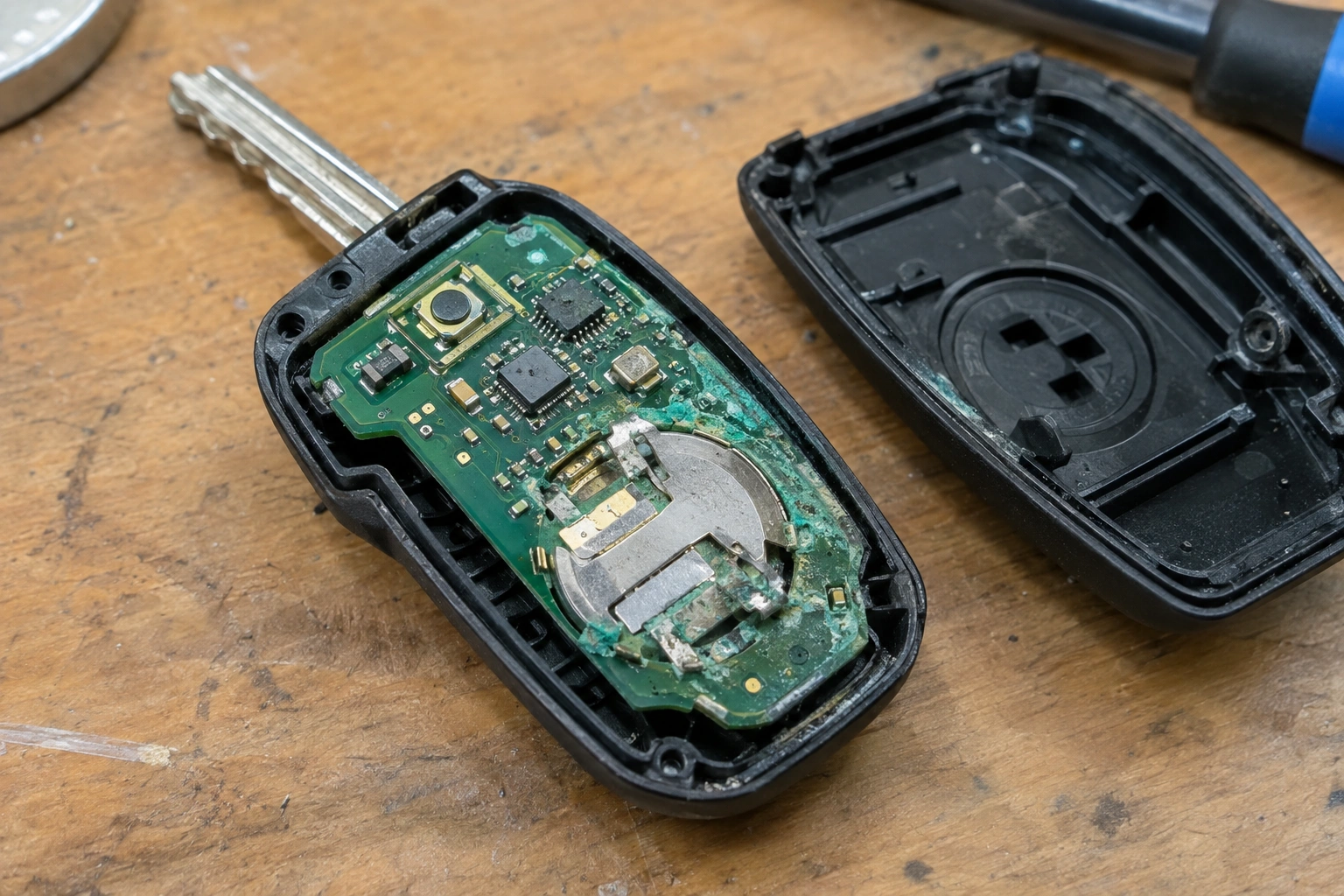
A multimeter can help confirm whether the battery itself is healthy. If the battery tests normal but the fob still acts erratically, that makes board damage more likely.
What you can see matters. Visible damage on the board is a meaningful sign that the fob may need repair or replacement. The same advice appears in Keyless Entry Remote’s repair guide.
Step-by-Step Troubleshooting to Confirm the Problem
Use this sequence so you do not skip the easy checks.
1. Replace the battery with a known good one
This rules out the most common failure first.
2. Test the fob close to the car
If it only works when you are very close, that suggests weak transmission or interference rather than a completely dead fob.
3. Try every button
If one button works and another does not, the issue may be limited to a button contact or a local board fault.
4. Inspect the battery compartment and PCB
Look for corrosion, loose parts, or residue.
5. Gently tap or flex the fob shell
If the fob works only when pressed or flexed in a certain way, that often points to a loose internal connection. That kind of intermittent behavior is more often board-related than battery-related.
6. Compare the behavior in another location
If the problem disappears somewhere else, signal interference may be the real culprit.
Can a Damaged Key Fob Circuit Board Be Repaired?
Sometimes, yes. Sometimes, no.
Minor corrosion, dirty contacts, or a cracked solder joint may be repairable by someone with the right tools and experience. A loose component can sometimes be resoldered. Small battery-terminal corrosion or a single damaged joint may be worth repairing, especially if the rest of the fob still works.
Some light cleanup can be done at home if the damage is limited to accessible corrosion on the battery contacts or a lightly affected area of the board. But if you see broken traces, missing parts, burned spots, or widespread corrosion, that usually calls for professional repair or replacement rather than a DIY fix.
If the board is heavily corroded, missing components, or damaged in multiple places, replacement is often the better choice. A repaired board may work again, but it may not be as reliable as a replacement fob.
The trade-off is simple: repair can save money when the damage is limited, but replacement is usually the safer route when the board has widespread corrosion or the fob has already failed repeatedly.
When to Consult a Locksmith
A locksmith is worth contacting when the fob still has some signs of life, but your troubleshooting points toward board damage rather than a battery issue. That is especially true if:
- the fob is intermittent after a battery swap,
- the board shows corrosion or cracked solder joints,
- the fob needs programming after replacement,
- or you are not comfortable opening the shell further.
A locksmith is often the better choice for programming a replacement fob, while a dealer may be necessary for some vehicle makes and models that require specialized security access. An electronics repair shop can be the better option when the board itself may be repairable but the housing and buttons are still usable.
If you need a backup-start workaround while you sort out the fob, our guide on Emergency Start When Key Fob Is Not Detected explains the usual next steps.
What to Do Next if Your Fob Is Still Unreliable
If the battery is fresh, the contacts are clean, and the fob still acts up, treat the PCB as the likely suspect. At that point, the decision usually comes down to three questions:
- Is the damage visible and limited?
- Does the fob still work inconsistently, or not at all?
- Is the cost and effort of repair worth it compared with replacement and programming?
If the answer is “limited damage and still some function,” repair may be worth a shot. If the answer is “heavy corrosion, repeated failures, or no response even after basic checks,” replacement is usually the more practical move.
The main thing is not to keep buying batteries and hoping the problem disappears. Once the symptoms point to board-level trouble, you are better off diagnosing the electronics than guessing at the battery again.
FAQ
Can a key fob with circuit board damage still work sometimes?
Yes. Intermittent operation is one of the most common clues that the board or an internal connection is failing.
Does water damage always ruin a key fob?
Not always, but even small amounts of moisture can cause corrosion or delayed failures. The longer it sits, the worse it usually gets.
How do I know if it is the battery or the board?
A fresh battery is the first test. If the fob still behaves erratically, especially after drops or water exposure, the board becomes more likely.
Should I try cleaning the board myself?
Light cleaning of obvious battery corrosion can help, but if you see heavy corrosion or damaged components, stop there and get it checked professionally.
