
Key Fob Emergency Start Procedure: How to Start a Push-Button Car When the Fob Battery Is Dead

A dead or weak key fob battery can feel like a dead end, especially when your car uses push-button start. The good news is that many vehicles have a backup way to recognize the fob long enough to start the engine. That backup method is what people usually mean by the key fob emergency start procedure.
The catch is that the exact method is not universal. Some cars want the fob pressed directly against the start button. Others use a marked pocket, slot, or console reader. A few models use a hidden physical key for entry and then a close-range backup start point inside the cabin. If you use the wrong spot, it can look like the fob is “dead” when the car is really just not seeing it in the right place.
Here’s how to figure out what you have, try the correct backup start method, and decide whether you need a simple battery swap or a deeper fix.
Quick symptom guide: what your car is probably telling you
| Symptom | Most likely cause | Best next move |
|---|---|---|
| “Key not detected” message, but the car unlocked earlier | Weak or dead fob battery | Try the emergency start procedure and then replace the battery |
| Fob unlocks doors, but engine won’t start | Fob signal issue, weak battery, or backup reader placement problem | Check the backup reader location and try again |
| Fob does nothing at all | Dead battery, damaged fob, or missing internal battery contact | Use the physical key if available and test the backup start method |
| Emergency start worked once, then failed again | Battery is too weak to rely on | Replace the fob battery soon |
| Backup start never works | Wrong placement, vehicle battery issue, damaged or unprogrammed fob | Check the manual and consider locksmith, dealer, or roadside assistance help |
If you want a deeper breakdown of the “key not detected” message, see our guide on starting a car when the key fob is not detected.
What the key fob emergency start procedure actually does
Most push-button start systems use passive keyless entry and an immobilizer. In plain terms, the car normally looks for a signal from the fob before it will let the engine run. When the fob battery is weak or dead, many vehicles still have a short-range backup way to read the fob at close distance.
That backup can work in one of two common ways:
- Contact start — you hold the fob directly against the start button or a marked spot near it.
- Pocket or slot start — you place the fob in a designated reader area, pocket, or slot inside the cabin.
Kia’s owner guidance for a dead smart key battery says to sit in the driver’s seat, press the brake pedal, and press the ENGINE START/STOP button directly with the smart key at a right angle to the button. That’s a good example of how close-range backup detection can still work even when the battery is dead. You can see that method on Kia’s official support page: starting a car when the smart key battery is dead.
Find the backup reader, pocket, or start sensor
This is the step that trips up a lot of drivers. The backup reader is not always obvious, and it is not always in the same place from one brand to another.
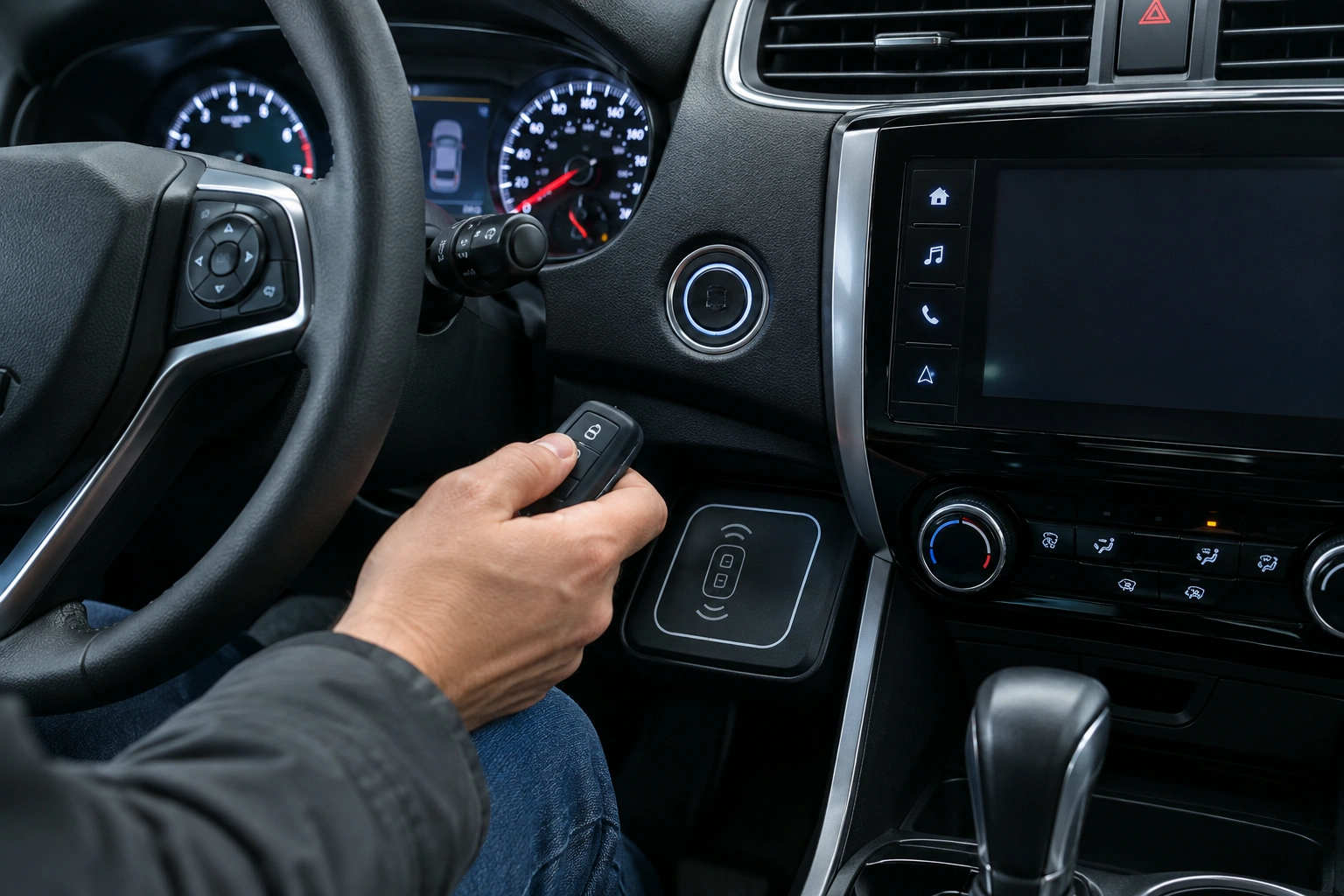
Look for clues in and around the push-button start area. Common signs include a small key icon, a fob symbol, a labeled “slot” or “pocket,” or a shallow recess in the center console, steering column, or lower dash. Some vehicles place the reader right beside the start button; others hide it in a cubby, cupholder area, or console pocket. If you see a marked outline or a spot shaped like the fob, that is often the intended location.
Common locations include:
- directly on or around the push-button start
- a marked fob pocket in the center console
- a small slot near the steering column
- a designated area in the dashboard or lower center stack
Some vehicles also have a hidden physical key inside the fob. That key is usually used to unlock the door first, which gets you inside so you can try the backup start method.
Do not guess if you can avoid it. The owner’s manual is still the best source for the exact location and orientation. If you do not have the paper copy, search the manual PDF on the automaker’s website using your model year and trim.
Step-by-step: try the emergency start method
If your car has push-button start and the fob battery is dead or near dead, use this sequence.
1) Get inside the vehicle safely
If the doors are locked and your fob has a hidden physical key, use that to unlock the driver’s door. If you do not know where the key release is, look for a small button or latch on the fob body.
2) Sit in the driver’s seat and press the brake
Most push-button start vehicles still require the brake pedal to be pressed before the engine will crank. If your model is different, the owner’s manual will say so.
3) Use the backup start point your car was designed for
Try the method your vehicle supports:
- If your car uses contact start: hold the fob directly against the start button or the marked area around it.
- If your car uses a slot or pocket: place the fob fully into the designated reader pocket or slot.
Some vehicles may require the fob battery to be completely removed, or the fob to be held in a very specific orientation, before the backup reader will detect it. If the fob has a logo or marked side, use the orientation shown in the manual. That is one reason a generic “hold it near the dash” tip can fail.
4) Press the start button normally
Keep the fob in position and press the start button. If the system recognizes the fob, the engine should start.
5) Remove the fob and confirm the dash warning is gone
If the vehicle starts, check whether the “key not detected” or similar warning disappears. If it stays on, the fob may be weak enough that it worked only as a temporary backup.
Dead battery versus damaged fob: how to tell the difference
A dead battery and a damaged fob can look similar from the driver’s seat, but they are not the same repair.
Signs pointing to a dead or weak battery
- The fob worked recently, then became unreliable
- Lock/unlock range got worse before the no-start problem
- The backup start method works once or twice
- The car shows a low fob battery warning
Signs pointing to a damaged or unprogrammed fob
- The fob never worked well, even with a fresh battery
- Buttons are physically broken or stuck
- The fob was dropped, soaked, or cracked
- The backup start method fails even when placement is correct
- Another known-good fob works, but this one does not
If the fob battery is the issue, a battery replacement is usually the first fix to try. If the electronics inside the fob are damaged, a battery swap will not solve it.
For a related diagnostic path, see our article on what to check when a key fob turns on but won’t start the engine.
If the emergency start still does not work
When the backup start method fails, work through the likely causes in this order.
Check the placement again
This sounds simple, but it is the most common miss. A fob that is a little too far from the reader may not register. Move it directly onto the start button, pocket, or slot the manual specifies.
Try the other fob if you have one
If you have a spare fob, test it. If the spare works, the problem is with the original fob, not the car.
Watch for vehicle battery problems
A weak car battery can create strange symptoms that look like a key fob issue. If the dash is dim, accessories are acting odd, or the vehicle has been sitting, the car battery may be part of the problem. If the vehicle battery is dead, the emergency start method may fail even if the fob is fine.
Remove interference
Move phones, metal cases, and other key fobs away from the start area and try again.
Check for physical damage
If the fob is cracked, swollen, or has been exposed to water, stop forcing the issue. A damaged fob may need replacement instead of a battery.
Consider an immobilizer or programming issue
If the vehicle still refuses to start with a known-good fob, the issue may involve the immobilizer system, the reader, or the fob’s programming. That is the point where home troubleshooting starts to run out of road.
What to do after the car starts
Getting the engine running is only half the job. The goal is to avoid being stranded again.
Replace the fob battery
If the backup procedure worked, replace the battery as soon as you can. Check the old battery for its type, or confirm the correct battery type in the owner’s manual before buying a replacement. That is especially true if the fob had been acting weak for days or weeks before it failed.
Test the fob from normal range
After the battery replacement, check lock, unlock, and remote start functions from a normal distance. If range is still poor, the battery may not have been the only problem.
Keep an eye on warning messages
If the dash still shows a key-related warning after a battery change, the fob may need service or reprogramming.
Save the manual note for your model
Write down where your car’s backup reader is located and how your model wants the fob positioned. That small note can save a lot of time later.
When to Consult a Locksmith, Dealer, or Roadside Assistance
Call a locksmith, dealer, or roadside assistance if any of these apply:
- the fob is physically damaged or water-damaged
- the backup start method fails with both fobs
- the vehicle battery seems weak or the dash is unstable
- the car shows a persistent key or immobilizer warning
- you cannot find the backup reader location in the manual
- you are stuck somewhere unsafe and need the car running now
A locksmith can often test the fob, confirm whether the battery is the issue, and tell you whether the fob needs replacement or programming. If the problem is vehicle-side, a dealer may be the better next stop. Roadside assistance may also help if the issue is the vehicle battery rather than the fob.
For another angle on the same problem, our guide on why a car won’t start but the key fob unlocks doors can help you separate fob trouble from other no-start causes.
FAQs
Will a car start with a completely dead key fob battery?
Often, yes. Many push-button start systems have a backup read method that works at very close range. But the exact procedure depends on the vehicle.
Where do I hold the fob for emergency starting?
That depends on the model. Common spots are directly against the start button, in a marked pocket, or inside a dedicated slot.
Does every push-button car have an emergency start method?
No. Many do, but not all use the same setup. The owner’s manual is the safest place to confirm.
Why does my car say “key not detected”?
Usually the car is not receiving a usable signal from the fob. That can mean a weak battery, a damaged fob, interference, or a vehicle-side detection issue.
Should I replace the fob battery or the whole fob?
Replace the battery first if the fob was working recently and the backup start method still works. If the fob is damaged or unresponsive even with a fresh battery, replacement may be necessary.
What if the backup start method works once and then fails again?
That usually means the battery is too weak to rely on. Replace it right away and retest.
Is the emergency start method different by brand?
Yes. Some brands want the fob pressed against the start button, while others use a pocket or slot. Always verify the exact method for your model.
Knowing the correct backup method can turn a frustrating no-start moment into a quick fix. Once the car is running, the real win is fixing the fob before it leaves you stranded again.
